 |
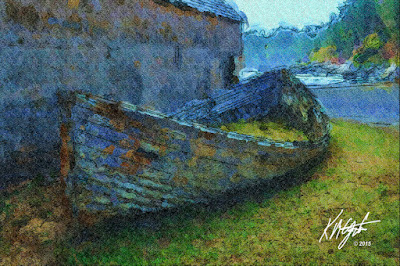
| Old Boat |
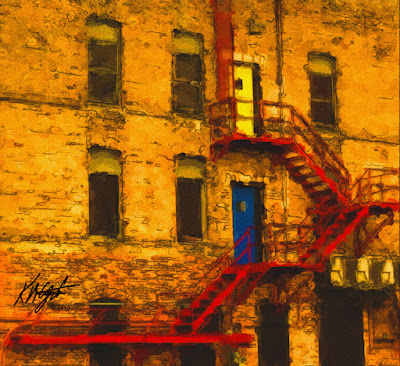 |
| Red Escape Stairway |
I went ahead and purchased
Corel Painter Essentials 5 at 30% off. I welcome it into my arsenal of Digital Visual Art Programs. It will accomplish much as I create new Digital Visual Artworks. And it is a Current Version supported by
Corel Corporation. A big plus as much of what I use are
Legacy Corel Programs, which sometimes work wonky with
Windows 10.I perused
Morguefile for Free Photos this afternoon and discovered a few photographs I plan to Digitally alter and display here on
gatzkART!. Take for instance this image I worked on today.
An Old Boat no longer in use, beached for a while it seems. I opened it in
Painter Essentials 5 and digitally painted as a Watercolor Sketch, a Wet brush, and regular paper. I used the color palette from the original photograph. After it was painted I selected Apply Surface Texture, using an angular texture. I saved that large iteration.
I opened this in
Corel PSP Pro X3. Here I applied the Smart Photo Fix, brightening it, increased the color, and shadows. I then used the Curves to add depth to the colors. I upped the Saturation Vibrancy by 33 for that punch I like. I added my signature, which I finally placed in it's own folder to find the black or white one easier. I fit and placed it using the property Lighten for transparency. I saved this large file again.
I resized for display and then adjusted the Curves again as some depth was lost in downsizing. I saved that file at 150dpi RGB 8-bit JPG.
Still testing
Corel Painter Essentials 5 I used a
Building with Red Escape Stairs for my subject today, also from
Morguefile Free Photos. I used the Watercolor Sketch setting, Tapered Camel Brush, Worn Pavement Paper and I also added back in some details. I used the Acrylics & Oil Glazing Round Brush for that. I upped the Saturation in
Essentials 5.I then opened in
Corel PSP Pro X3 and added Saturation Vibrancy for the pop to the colors. Here I also added my signature file as a layer, sizing it and placing it, applying the property Multiply for transparency. I merged all layers and saved the large file at 150dpi, RGB 8-bits.
I saved this almost square Digitally Painted photograph for display by resizing it still at 150dpi and RGB 8-bits, JPG.
I am thoroughly enjoying using
Corel Painter Essentials 5 and it's diverse selection of brush variants and settings for creating Digitally Painted Visual Artworks. I would recommend this program to those who would like to create great paintings digitally. It is still on sale at 30% off until midnight October 22, 2015, that's tonight. Search for
Corel Corporation and
Painter Essentials 5 for the sale.


