Showing posts with label CorelDRAW. Show all posts
Wednesday, March 2, 2016
"FREE Downloads of CDBaby songs - Originals!" CDBaby - CorelDRAW
The Tally has been done. I had to disqualify one song as it was released in February 2016 and had many first time hits. So out of the remaining eleven songs the WINNER is "Something Amazing!" This will now show as it's price $0.00 for a Free Download.
As I reviewed the ALL TIME hits for all the tunes I saw that the song with the most overall Hits was "Open Secret!" AS A BONUS I MADE THIS SONG FREE TO DOWNLOAD AS WELL!
Two of my songs for FREE! "Open Secret," is at http://www.cdbaby.com/cd/kirkmathewgatzka Visit the link and Select this BONUS song!
The winning song "Something Amazing," is to be found here: http://www.cdbaby.com/cd/kirkmathewgatzka9 Select this for the Winner!
Both songs are available now at CDBaby for a FREE DOWNLOAD!
Thanks to all who participated and I hope you enjoy all my Music!
You will need to set up an Account with CDBaby to download the free songs. Put them in your Cart and Download for $0.00!
Labels:
banner,
CDBaby.com,
CorelDRAW,
FREE Download,
indie music,
Open Secret,
PhotoPaint,
Something Amazing,
Winner
Monday, August 3, 2015
"How to - with outdated Corel Products - Grunge Guitar Player" Corel
![]() |
| Grunge Guitar Player |
I took this photograph at a Taylor Guitar Show at Motor City Guitar quite a while ago. I decided to work at this piece in a way I have not worked in quite a while. First I opened in Corel PhotoPaint 12 and used the Posterize tool set on 4 on it. This gave me plenty of color to work with for the next step.
I saved that file and opened it in CorelTRACE 12 and Traced it into a Vector file with the Advanced Outline tool. I saved this iteration as a native Corel CMX vector file. I then opened it in CorelDRAW 12, here I Ungrouped all the traced Vector elements of the image. I began to play with downsizing by eliminating some parts grabbing them with the selection tool and deleting them. I then selected some of them and changed the colors with the Gradient (using both Radial and Linear gradients) and Fill tools.
Taking the selection tool I grabbed what was left of the image and Grouped the entire Vectored pieces back into one Group. I Converted it into a Bitmapped file and copied it to the clipboard. I reopened PhotoPaint and opened the New File from the Clipboard, at 300 dpi. I then adjusted some of the other parts with the Wand tool to select, and the Fill tool for colors and textures. I applied myself to this until I was satisfied the image no longer looked much like the original photograph.
I used, next, Filter Forge's Frames for a Grunge look and feel to the image. I selected a setting after trying out different variants of a Grunge frame, settled on one and applied it. I saved the image with my signature added. I resampled for a display size.
My recent disappointment was to find out that the Corel Products I use to create much of my Digital Visual Artwork is NOT compatible with Windows 10, my reserved package of Windows 10 will not even download onto my computer. I checked and it indicated that it was my Corel Products that were stopping it. I did want to try Windows 10 later this year before the free version is turned off, but it won't download.
I even went to the point of uninstalling all my Corel Products, but with Windows 7 hiding someplace in the Programdata folders were pieces of Corel still there. Windows 10 would not download! I know this is the problem, it is not a hardware problem, it says I meet that standard easily.
Lets face it I am a Disabled Artist on a very tight budget. I am not able to upgrade my Corel Products at this time. So I am continuing to use Windows 7 Pro and my Corel arsenal of graphics programs.
So I suppose that sometime in the future I will have to find those remaining hidden files and folders, uninstall my prized Corel programs and maybe be able to download my copy of Windows 10!
Saturday, July 25, 2015
"New Milestone for 'gatzkART!'" - 160,000 Plus Pageviews - Thank You
![]() |
| 160,000 Pageviews Milestone! |
By the time this posts "gatzkART!" will have reached over 160,000 plus Pageviews. Another Milestone for this blog, its Digital Visual Art and its Music for everyone!
Without regular viewers along with new viewers we could not have reached this goal! Many Thanks for revisiting and coming by to listen to some Music and view some Digital Visual Artwork! You are all important to the success of "gatzkART!".
Visit and Tarry for a time,
All will come to see
Somethings sublime
And Music for subtlety.
Kirk Mathew Gatzka
Wednesday, November 19, 2014
"Young Lady - Lovers" Paint.NET CorelDRAW
![]() |
| Lovers |
![]() |
| Young Lady |
Programs used for Lovers:
- Paint.NET Ink Sketch tool
- Corel Painter Photo Essentials 4 Modern Painting
- Corel PSP Pro X3 to layer and Merge the Pen and Ink with the Painting
- CorelTRACE Traced and export as native CMX file
- CorelDRAW to place and fix size, convert to bitmap
- Corel PhotoPaint to add signature and resample to display size
Programs used for Young Lady:
- Corel Painter Photo Essentials 4 Simple Watercolor for Texture
- Corel PSP Pro X3 to layer Young lady, use Threshold tool and blend Texture
- added black border in PSP and signature
Please click on each image above for a larger view of each. Comments always welcome. Pluses anguished for! On Google+
Thanks for visiting!
Friday, November 14, 2014
"Sunglasses and Stripes Woman's Portrait" Corel
![]() |
| Sunglasses and Stripes Woman's Portrait |
This piece was opened in CorelTRACE first and turned into a CMX vector graphic. I saved it an opened in CorelDRAW. There I added some gradient colors and converted the grouped vector pieces to bitmapped. I copied that to the clipboard.
From there I opened in Corel PhotoPaint, New From Clipboard, it was a very large 300 dpi file. I applied the Artistic tool Crayons to it and then I added a Canvas Texture from Effects. I also used the Tone Curve to give the colors more depth.
Saving that iteration I resampled the image to display size. I added my signature to it and saved the medium sized image with compression set at 75 and smoothness at 33. I opened it in Corel PSP Pro X3 and upped the Saturation with Vibrancy. With Image Information I added Title Copyright, Programs used and saved again.
Feel free to browse my Labels Cloud at the bottom of the page for more Digitaal Visual Art of a variety of styles, including Collage.
Labels:
color,
Corel,
CorelDRAW,
CorelTRACE,
crayon filter,
PaintShop Photo Pro X3,
PhotoPaint,
visual art,
woman
Tuesday, November 11, 2014
"Colorful Digital Portrait - Young Lady" - CorelDRAW
![]() |
| Colorful Digital Portrait - Young Lady |
I selected another Young Lady photograph from my MorgueFile research for today's post. I opened CorelTRACE and loaded the large file. I Traced using Advanced Outline. This gave me a native CMX file that I opened in CorelDRAW.
I Ungrouped the traced pieces and then I used differing gradients, and textures, to fill each area. This led to a colorful image of the Young Lady. I added a turquoise rectangle to the back of the pieces. I selected all the traced pieces, and the rectangle, and Grouped them as one unit. I then converted it to a bitmapped file. I copied the large bitmap to the Clipboard.
I opened Corel PhotoPaint and pasted New From Clipboard the copy. I added my signature in black. and saved the large file at 300 dpi. I resampled for display size, compressing by 62 and softened by 33, for a smaller file to load faster.
Be sure to click on the file for a larger view of it. F11 in Chrome will give you a full screen view, F11 back to the regular settings.
Comments are always welcome on experiments like this image. Feel free to browse "gatzkART!" for additional Digital Visual Art, as well as Woodward Dream Cruise Custom and Vintage cars, guitars images, along with other works. See the Labels Cloud by scrolling down to the lower parts of the blog page, Browse the topics and view them with the explanations of workflow used to create the images.
Labels:
color,
Corel,
CorelDRAW,
CorelTRACE,
lady,
MorgueFile,
PhotoPaint,
texture,
visual art,
young
Friday, November 29, 2013
"Eye, Nose, Lips 1A," Canon - Corel
![]() |
| Eyes, Nose, Lips 1A |
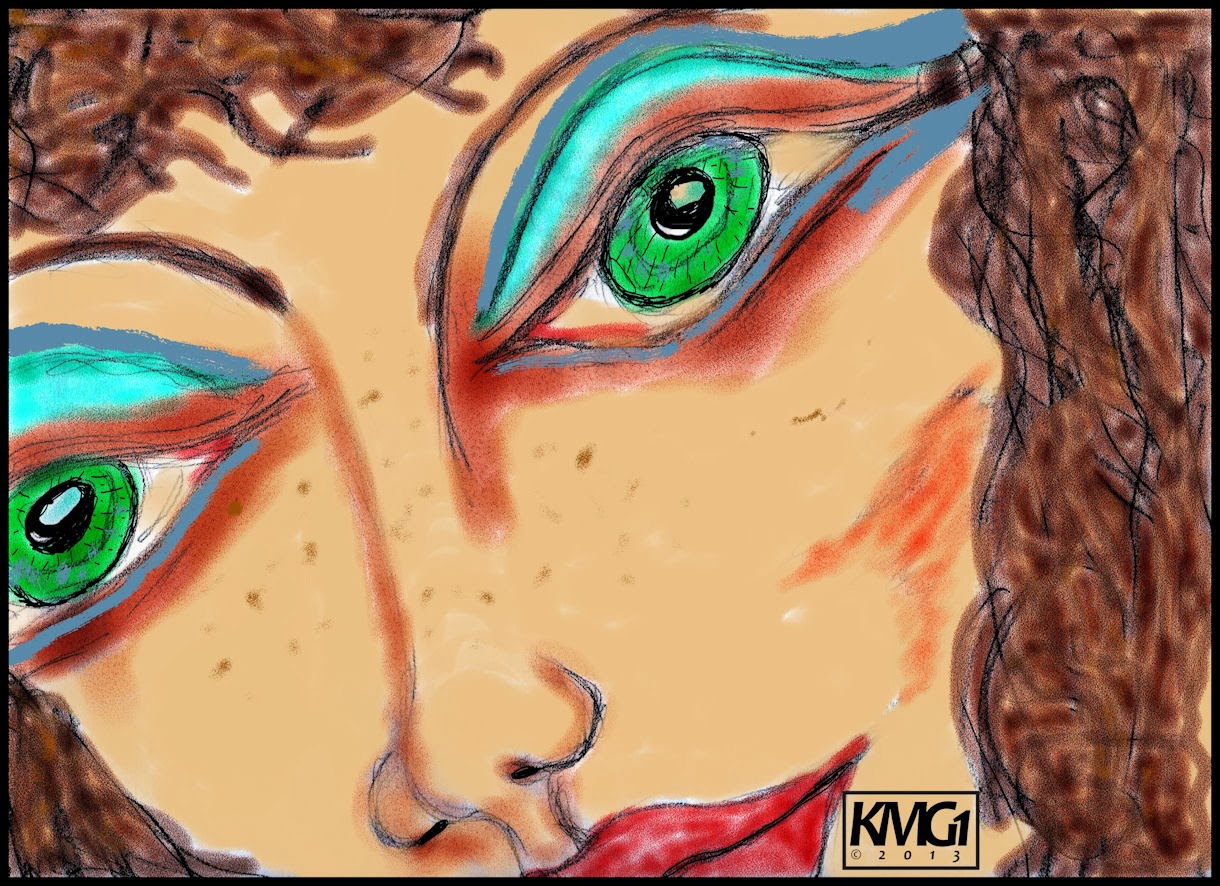
Throughout my Archives I keep finding images, many pencil sketches, of interest to me. I found four today and selected the image you see. "Eye, Nose, Lips 1A," is a pencil sketch of unknown date. I scanned in the pencil sketch with my Canon MP495 with a small amount of cropping. I like the way the face fills the screen, viewed in large mode.
I took this scan and opened it in Corel Painter 11. There I used Watercolor Brushes, Tinting Brushes and Liquid Ink Brushes on it. I painted it for bold color but fairly realistic coloring. I used Painter's Mixer to blend up a flesh tone for the Tinting process for the face. I applied the Liquid Ink as Eye shade color and freckles, using the palette I created with the flesh tone. I saved that iteration at 300dpi.
I opened CorelDRAW to create an Initials copyright symbol. I used Candara Font and drew the characters closer together. I added the copyright symbol and date expanding the characters to fit. Then using a bold line I drew a box around the Initials and copyright. Grouping that I saved it as a native CDR file. Copied and pasted it into the image.
I saved the file again. I opened with Corel PSP Pro X3 and added a 25 pixel black border. Using the Image Information I added a Title, Copyright Information, and Equipment and programs used to create this image. Saving that at the large size I resized to display here and saved that file.
So here I am sharing another older image with a new twist to it, the Corel Painter 11 twist. I used my Wacom Tablet which is ancient and acts like a mouse (i.e. no full screen coverage,) but it still paints better than a mouse.
There is no driver for my Wacom Graphire tablet for Windows 7 32-bit, so I use it carefully as I paint, moving my hand position to the part of the screen I need to be at. It is tedious but worth the time it takes and it paints nothing like a cumbersome Mouse.
NOTE: I researched for a compatible Wacom Driver and selected an older Driver that was compatible with Win XP; I downloaded that and it installed with that compatibility set. Now My Wacom Tablet is working as it should covering the entire screen and is very sensitive to use, more than previously. Kudos to Wacom for this Driver!
Monday, November 11, 2013
"Vector Women, Digital Collage - Dual Faces" Corel - Canon
![]() |
| Brown Hair Green Eyes Vector |
![]() |
| Multi-Colored Hair Vector |
![]() |
| Dual Faces Collage |
Digging further into the detritus of my Art Garden of Journals I discovered some images I wanted to share. Both of the first two images are scans of printouts. They originally started out as Vector Images done in CorelDRAW, saved onto Iomega Zip100 disks I no longer have access to.
I used my Canon MP495 Printer All in One to scan them in and crop. I used Corel PhotoPaint to touch them up slightly with a touch of Tone Curve. I added my signature and saved large iterations and then resampled for display.
The Third Image is a Digital Collage of three scans. One is a Pen and Ink sketch of a German Immigrant Woman. Another is a Pencil sketch of a Sad Man. The last one is the base of color, which if I remember correctly, was a Painter 8 playful painting using varied brushes like Liquid Ink. I cropped and layered all three images, some Tone Curve adjustments and Saturation Vibrancy, as well. Again I added my signature and saved the large files and resampled for display.
Labels:
Canon MP495,
color,
Corel,
CorelDRAW,
digital painting,
digital sketch,
drawing,
Journals,
PhotoPaint,
scanned,
Vector,
visual art
Tuesday, October 15, 2013
"Vintage Circa 1990's Digital Visual Artworks" Corel
| Azuretai Abstract |
| Abstract Floral |
| Brown Face |
Here are three more (what I call Vintage,) Digital Visual Artworks. Azuretai is a Vector graphic Abstract done in an older version of CorelDRAW. It was enlarged to a JPG format and lost it's clean straight lines and gradients. But I is still an interesting early vector abstract.
The Abstract Floral is based upon a freehand image that was scanned in and manipulated in Corel PhotoPaint. I love the computer colors used to add punch to this image.
Brown Face was done using a Wacom tablet and pen on the computer freehand. The image was small and enlarged and softened.
All images were put through Corel PSP Pro X3 for cleaning of Digital Noise and JPG artifacts and moire patterns.
I am enjoying sharing these older and colorful images, they represent my early Digital Visual Artwork.
Saturday, April 20, 2013
"100 Thousand Pageviews - Milestone!" CorelDRAW
Created in CorelDRAW.
I wanted to add to this Page a NOTE that invites those of you whom come to his simple
page offering of thanks to peruse the rest of my blog offerings and not just bounce away
disappointed by the meager artwork here as thanks. I have much more to share here,
If you would take the time to look deeper into my Digital Visual Artworks.
Scroll down, view on the right Archive links and click on them. Also I have a tag cloud
at the bottom of the page you can select and view by topic. For Example click on 12_String for
additional Guitar Artwork, and select Older Pages for more!
It is my hope you enjoy my Digital Visual Artwork created to delight and leave
an impression on you. A Good One is my desire!
I wanted to add to this Page a NOTE that invites those of you whom come to his simple
page offering of thanks to peruse the rest of my blog offerings and not just bounce away
disappointed by the meager artwork here as thanks. I have much more to share here,
If you would take the time to look deeper into my Digital Visual Artworks.
Scroll down, view on the right Archive links and click on them. Also I have a tag cloud
at the bottom of the page you can select and view by topic. For Example click on 12_String for
additional Guitar Artwork, and select Older Pages for more!
It is my hope you enjoy my Digital Visual Artwork created to delight and leave
an impression on you. A Good One is my desire!
Thursday, March 14, 2013
"Winning Logo for KMG Therapeutic Massage" CorelDRAW - Plus
Here is the winning Logo for my Son's Massage Therapy business. KMG Therapeutic can be found online at the following link:
http://www.kmg-therapeutic.massagetherapy.com/
You can request an Appointment Online if you are in the Counties listed below. He will come to your business location and give Chair Massages. (see below)
He is also building a Facebook page for the business and is listed in the YP.com (Yellow Pages) directory in the Ortonville, Michigan area as a Massage Therapist.
http://www.yellowpages.com/48462/massage-therapists?q=Massage+Therapists
Right now he is listed around the number four slot, but we will be improving his visibility on the YP.com listings. He will be accepting Cash and Major Credit Cards for payment.
His business serves the Oakland and Genesee County area. His main clientele are Businesses for In Office Chair Massage and In Home Full Massage at your location. He will also be doing some clients at His residence Massage Room.
If you would like to please visit his website and read some of the testimonials listed and browse the site. You will also notice he is a member of and insured by ABMP a Massage Professional Association. You can click on their logo on his site for more information about ABMP.
The KMG Therapeutic Logo was a combined effort of both myself and my son's ideas and Created in CorelDRAW in it's native CDR format and converted to JPG format for display here.. Unauthorized use is prohibited. The winning Logo was selected by votes from friends and family, and was highly thought of by the YP.com Representative.
Friday, March 8, 2013
"Artists In The Plus - The First Compilation" CorelDRAW - Plus
![]() |
| Entry One |
![]() |
| Entry Two |
![]() |
| Entry Three |
![]() |
| Entry Four |
"Artists In The Plus," on Google+ is making it's first compilation of Music from Indie Musicians. Singer Songwriters and many of their artists will be sharing their music. Because of this I have joined their CONTEST for Album Art and what I am showing today are images I have shared with them.
I have used my Corel products like CorelDRAW, PSP Pro X3, PhotoPaint to create these differing Album images all with their LOGO.
I have some other ideas to work on, the fans will select from all the entries from myself and other Google+ Artists doing Digital Art.
Labels:
Artist in the Plus,
CONTEST,
Corel,
CorelDRAW,
Google+,
music,
PaintShop Photo Pro X3,
PhotoPaint,
Picasa 3.9,
promotion,
visual art
Friday, February 22, 2013
"KMG Therapeutic Massage LOGOS" CorelDRAW - Plus
![]() |
| KMG Therapeutic Massage Logos |
Between Hardware problems relating to my Video cards and working on these Logos for my Son's Massage Therapy business, I have been neglect full of posting here. We also have been joyfully watching our Grandson who is about to turn three years old, playing with him. So I have been busy.
I created the logos in CorelDRAW and these are the best ones as of today. I like the bottom left one, it is my favorite. You can leave messages as to your favorite if you would like. My Son is an excellent, Certified Massage Therapist and would appreciate any input. These logos are ©2013 by Kirk Mathew Gatzka and are not for unauthorized use or copying.
We are working on our own trifold brochure for him to use for In Office Chair Massage. Then we will create another one for his In Home Massage Therapy. All by appointment only. We are using an Avery 8324 brochure template, downloaded from Avery for MS Word. I have created other brochures in CorelDRAW so if we decide that the template is not to our liking we will make them in CorelDRAW. Now if I can remember how to make a text box, hmmm.
My travails with the video card has sent me backwards to my original OEM motherboards VGA connection which is much slower than the cards I tried to install. Both are Nvidia Geforce cards. I had one that I bought a DVI cable for and it never worked as VGA or DVI. I contacted Nvidia and they suggested it was a defective card.
Well, I recieved the card as a gift so I have no recourse to get a refund, how does one refund a gift? The other card was functioning for a time but had low speed just a tad faster than the OEM VGA connection. So I am now having trouble getting into SafeMode on my Windows PC to try and fix the problems.
The current VGA works fine, I was trying to improve the operation of the video. Looks like I have failed and possibly made some sort of other problems on this aging computer. As long as it works and is not failing I will not be forced to get a new PC.
Labels:
Avery,
CorelDRAW,
Hardships,
image,
inspiration,
Logo Design,
MS Word,
typography,
Video Cards,
visual art
Sunday, February 10, 2013
"The Strangeness of Quantum Physics" CorelDRAW
![]() |
| Click on Me! And Read! |
Pieces of Dover Clip Art from my folder in Picasa 3.9 put together in CorelDRAW. h = What? A good question, "Like a wave or Like a particle," Its all Physics to me!
I grouped all the pieces including my comments and the large question mark together and copied to the clipboard and pasted into Corel PhotoPaint as New from Clipboard. I resized it there for display. Quantum Sweetness, to read about. "Its all so Strange!" Link to Wikipedia "Physics Strangeness"
A fun post.
Labels:
CorelDRAW,
digital collage,
Dover Clip Art,
Infographics,
lessons,
PhotoPaint
Wednesday, January 16, 2013
"Self-Portrait Digital Collage" Corel - Plus - Logitech
![]() |
| gatzkART - Self-Portrait |
Today I updated my Logitech C260 Camera's software and was playing around with it. I took a couple of hi-res photographs of myself. I decided to do a self-portrait collage with one of them.
I opened the photograph with Corel PSP Pro X3 and applied the workflow I use for digital camera photographs, Noise Removal and Smart Photo Fix. I also applied the Skin Softening tool to the photograph.
I saved that iteration. I opened both Corel PhotoPaint and CorelDRAW and also Picasa 3.9. I used Picasa to locate a Art Nouveau background and other clip art pieces, in my Dover Clip Art folder. I used the Local equalization on the background. Added another yellow based floral on it, adjusting the Opacity.
I opened the self-portrait and cut my self out of the image and copied that to the clipboard. I pasted it on the background and used Multiply and Opacity for transparency.
I used a drop cap "G" for the word "GatzkART," and used DRAW for the text. I also altered the Opacity of the word and the Tone Curve of the capital "G" changing it's depth (I also changed it to green to match the "atzkART" portion.
Using my Dover Clip Art Samplers I added the women and a couple of designs in black using the property Multiply and the Tone Curve to darken them.
I added a small green border in PhotoPaint using Papersize, and then my signature in black. I merged all layers (objects) to the background to finish.
Wednesday, January 9, 2013
"Lisa Marshall In the Spotlight" Artists in the Plus - CorelDRAW - Plus
![]() |
| Lisa Marshall |
I was able to attend the Artists in the Plus "In the Spotlight" the other night on a Google+ Hangout on Air. I viewed it from YouTube live stream. The Guest was +Lisa Marshall , and she was not only interesting in her background but amazing in her singing and guitar.
Her singing was like a silver throated Janis Joplin. Punching out emotion and soul. I truly enjoyed her performing. Her guitar playing was strong and punctuated her songs with rhythm and great accompaniment.
Using Picasa 3.9 I took a few screen captures to work with and decided to join two images together. I opened Corel PhotoPaint to crop the images and then unified them to size in CorelDRAW. In DRAW I converted to bitmap and Traced to a Vector image with CorelTRACE. I was able to copy to the clipboard the traced image and in PhotoPaint I opened with New from Clipboard.
I saved the large bitmap file with the Vector artifacts to disk. I opened it in Corel PSP Pro X3 and punched up the color with Saturation Vibrancy. I did that after I applied the Smart Photo Fix. I applied the Polaroid frame and a black border in PSP Pro X3.
I added my signature in PhotoPaint and resampled for display size there.
Here are some links to the show and Lisa's website.
https://www.youtube.com/watch?v=MU9a6_khnz8 hosted by Artist in the Plus +John Voshell
http://lisamarshallmusic.com/
If you haven't tried a Hangout On Air yet on Google+ try one out by joining Google+ through your Gmail email address, you will be glad you did.
Sunday, January 6, 2013
"Floral Falcon" CorelTRACE - CorelDRAW - Plus
![]() |
| Floral Falcon |
I recently received some bird based Dover Clip Art and with it this colorful Falcon. I opened the image with Corel PhotoPaint and overlay another piece of Dover Clip Art of a Floral image. I used the property Multiply and adjusted the Opacity as well to let the bird show through clearly.
Saving that iteration I opened with CorelTRACE and turned it into a Vector image I saved that as a native Corel CMX file. I opened with CorelDRAW and made some minor adjustments. I copied to the Clipboard and pasted the large image into PhotoPaint with New from Clipboard. I added my signature and resampled to a display size.
I really like the way that the colors deepened with the addition of the Floral overlay. I did little to adjust it afterward, just used Picasa 3.9's Warmify filter on the image and saved that.
Birds and florals are among my favorite images and I like to use Them periodically instead of Guitars and Musicians for digital works.
Labels:
color,
Corel,
CorelDRAW,
CorelTRACE,
digital manipulation,
Dover Clip Art,
PhotoPaint,
Picasa 3.9,
Vector,
visual art
Friday, January 4, 2013
Wednesday, December 12, 2012
"Intense Blues Digital Poster" CorelDRAW - Plus
![]() |
| Ain't Nobody Gettin' Away |
Short post today. I combined some old "Blues Performers," into a Digital Poster. I used Corel PhotoPaint for the photos and the processing. I copied to the clipboard and pasted onto a new file in CorelDRAW. I added the blurbs and the backgrounds with the black signature and frame finishing it off.
I saved the large iteration and then resampled to display size. Funny I had more time when I got up this morning! Now it's dark out already. Amazing!
Labels:
Blues,
Bluesman,
Canon MP495,
Corel,
CorelDRAW,
digital processing,
experiment,
freehand,
guitar,
High Contrast,
PhotoPaint,
scanned,
visual art
Tuesday, December 11, 2012
"Design for Life - Live for Design" Again - CorelDRAW - Plus
![]() |
| Design for Life - Live for Design [click on for larger view] |
Continuing with the "Design for Life - Live for Design" phrase I selected in CorelDRAW the fonts Bodoni MT Black and Arial Narrow. Using them I created all capital rectangles of the phrase. I duplicated the Bodoni phrase and used Red as my main color and a black shadow behind.
I just used Arial Narrow on its own to complete the phrase. I duplicated again with the phrase placed within the other making one large rectangle. Grouping that I duplicated it and made it a smaller size. I ended up with the phrase five times.
I browsed for an Art Nouveau background in my Dover Publications Samplers and found one I liked. I lined up the five to dominate the floral design. I grouped the entire thing and copied it to the clipboard.
I opened as New from the Clipboard in Corel PhotoPaint. I saved that iteration as a jpg file. There I used the plugin Filter Forge's Photo Effects Grunge to add a linen effect to the piece. I had also added my signature very small in the lower left hand corner. Saving that as a different large iteration I resampled in PhotoPaint for display size and saved another file.
Labels:
Art Nouveau,
Corel,
CorelDRAW,
Design for Life,
grunge,
PhotoPaint,
visual art
Subscribe to:
Posts (Atom)