Pages

Showing posts with label Seagull. Show all posts

Sunday, February 2, 2014

"C12 Seagull Guitar in Case." Corel Painter - Irfanview

C12 Seagull Guitar in Case


I browsed my CD "Guitars & Stuff," and found a photograph of my "C12 Seagull Guitar in Case." I opened in Corel Painter 11.

Here I first Brightened the colors a tad. I then applied the Woodcut tool without black. I took that image an made it into a Sketch. At that point I enlarged the image on my screen to fit my workspace. I began to paint with a basic Color Palette. The browns, a bit darker as Watercolors than anticipated.

I used Various Watercolor Brushes and painted the piece. Yes, the wall was a Canary Yellow, and the inside of the Guitar Case was (is) a nice Red color. The background details were very sketchy so I painted them with a large brush size and kept them ambiguous.

I saved the large iteration and opened with Corel PSP Pro X3. I added some Vibrancy with the Saturation tool. I included a Title, Copyright, and Artist in the Image Information tool. Then I opened and copied and pasted as a new layer my Signature. I resized the signature and applied the Multiply property to it, I Merged (flattened) all layers. Adding a border of black I saved that iteration.

I closed PSP and opened the file in Irfanview to resize for display. I am experimenting with Irfanview, a great tool for batch processing image files and it's Freeware.

I added some yellow lines in Irfanview to lighten up the 12-String Guitar Body. I saved the file again.

Tuesday, January 28, 2014

"12-String Seagull C12 Guitar on Chair" Paint.NET - Corel Painter

12-String Seagull C12 Guitar on Chair


I selected a photograph from my Guitars and Stuff CD of my 12-String Seagull C12 Guitar. I opened it in Paint.NET and applied the Artistic Pen and Ink Sketch tool to it, without color, for a Black and White Ink Sketch. I saved the large image.

I reopened with Corel Painter 11 and painted it with the Digital Watercolors Brushes, varying the brush and sizes. If you look closely you can see, in the left hand corner the tail of our Cat Linus, who was sneaking out of the photograph as I originally took it. A fun balance of color with the browns of the Guitar and the Plant Basket.

I used three Brushes for the Guitar body, the last being Salt, giving a blended appearance to that. I saved that iteration and opened in Corel PSP Pro X3.

Here I added a layer of my signature and placed that. I also placed a Black border around the image. Using the Image Information tool, I gave it a Title, Copyright, Artist information, along with the programs used to create this piece. I saved the large iteration and then resized it for display here.


Sunday, January 12, 2014

"Shadow Guitars" Paint.NET - Corel Painter

Shadow Guitars


I have been remiss in not posting, but I have been quite busy lately. I am now trying to get some new photographs of my Seagull S12 Guitar for new images. This began as a photograph of two guitars with deep Shadows.

I opened the photograph in Paint.NET and applied the Effect, Artistic, Ink Sketch to it without color resulting in a black and white image. I saved that large image. I then opened it in Corel Painter 11 and painted it with various watercolor brushes. I boosted the Saturation in Painter and saved that iteration.

I created a signature file for my copyright for 2014, in a PNG file format. I opened both in Corel PhotoPaint and added the halftone Frame in Filter Forge Frames with a greenish cast. I added the signature to it and saved that iteration.

I opened the file in Corel PSP Pro X3 and added Image Information, Title Artist name, Copyright, etc. I saved the resized file for display.


Monday, August 12, 2013

"Digital Painting 12-String and 6_String Guitars" Corel Painter - Plus

12-String and 6-String Guitars

I browsed my guitar photographs and opened this one in Corel Painter 11. I digitally painted it there and used the following steps. I used my Wacom Tablet to paint with.

  • 1. Corel Painter 11
  • A. Brushes
  • 1) Two Airbrush variants
  • 2) Two Digital Watercolor Brush variants

  • 2. Picasa 3.9
  • A. Warmify
  • B. HDR 
  • C. Cinemascope

  • 3. Corel PSP Pro X3
  • A. Fit to window
  • B. Effects
  • 1) Speckles Brushstrokes
  • 2) Texture - Hatching
  • C. Adjust
  • 1) Saturation - Vibrancy
I added my signature in Corel PhotoPaint in White, resizing to display size for this post.


Saturday, August 3, 2013

"Yellow Floral with Ground Cover" Corel - Plus

Yellow Floral with Ground Cover


From our Garden another floral photograph. I browsed to the folder in Picasa 3.9 and then opened with Corel PSP Pro X3.

I applied the Smart Photo Fix feature, increasing the color. Added some punch to the color using Saturation Vibrancy at about a third. I then applied the Sharpen High Pass Sharpen Soft Light.

I saved that iteration. I resized for display and saved again under a differing name. Then I reopened with Corel PhotoPaint to add my signature in white, something my PNG files haven't let me do yet in PSP Pro, my fault no doubt.

I saved for gatzkART! and did this blog post for your enjoyment.

Guitar wise I was playing my 12-String Seagull and had it tuned in Open C Tuning. I made up some chords and rhythm and "Nonsense Words" and titled the song that.

Even though my amplifier is shot I can reroute my headset line through my PC Stereo Speakers; into my Line 6 Toneport UX1 and I recorded it in Audacity. I recorded the guitar first and then the words and made up the melody as I went. I saved as a project for further adjustments and exported as an MP3. I may put it on SoundCloud, but it was just for fun.


Wednesday, July 31, 2013

"Myself and 12-String Self-Portrait - Ink" Corel - Paint.NET

Myself and 12-String Self-Portrait - Ink


I was working with my Logitech C260 Webcam today and snapped this Selfie. I opened it in Corel PSP Pro X3 and adjusted with the Smart Photo Fix, some color and sharpening. I used the Skin Smoother on the image. The I added the frame and signature. I saved that iteration.

I opened with Paint.NET and applied the Effects Artistic Ink Sketch. Boosting the color a bit and increasing the Ink size to 70. This gave me the line work in the piece. I would say that the only thing I may have done different is the signature, as it has ink "artifacts" all around it. But not so many I am that concerned.

I still have my Seagull C12 tuned to Open G and will be trying other open tunings soon, perhaps today for a time of practice and fun.

I have found an Alt Tuning website at: http://www.howtotuneaguitar.org/tuning/drop-c/ for alternate tunings, in this case Drop C. I love to experiment with making up chords from other tunings by sampling the sounds within the alternate ones. Or I even make up chords, and play scales by ear for the learning experience. It's a challenge I really enjoy on the guitar.


Tuesday, July 16, 2013

"Thunderstorm and Internet Outage - Seagull C12 Digital Collage" Paint.NET - Corel

Digital Collage Seagull C12


Had another Thunderstorm and the power went out. I was offline and had powered down my system before that so I spared my equipment some electrical harassment. But after the storm passed - now - no Internet from my ISP! The travails of the current age.

So I drank a cup of coffee, half decaf and half regular and settled in at my workstation. I plugged in my External drive and browsed the folders in Thumbnail view looking for guitar photographs.

Finding some I made my selection, my Seagull C12 sideways (horizontally.) I opened the file with Paint.NET and applied the Ink Sketch with no color and a setting of 28 for the ink pen. I Then saved this large version to my local workstation.

I opened the file with Corel PhotoPaint and began creating some Masks that allowed some pasting of a skyline and a blue gradient into the piece. I also used a woodgrain fill for the guitar body mask. I played around with pieces of the guitar making an unusual looking instrument.

Selecting another photograph of my guitar I cut it out with the lasso tool and copied and pasted it into the collage. I applied curved feathering to the object selection and duplicated it in differing sizes for balancing out the composition.

I saved that iteration to my workstation and opened with Corel PSP Pro X3. Here I increased the Saturation using Vibrancy upping the color threshold. I applied my signature with the Visible Watermark tool. Then I selected the Picture Frame Cyanotype and framed the image.

I saved that iteration and resized for display in PSP Pro.

As I post this my Stereo Amp died a popping death! Now using old OEM Speakers, Can't use my Toneport for recording or playing back, it is unplugged. Bummer!

Saturday, July 13, 2013

"Guitars Dual Necks and Headstocks" - Picasa - Corel

Guitars Dual Necks and Headstocks


I browsed to my guitar folder in Picasa 3.9 and selected this photograph. We have since sold the Lyon by Washburn Guitar and now only have my Seagull C12 left.

I used Picasa's Brighten feature to lighten up the darker parts of the photograph. I then applied the Warmify tool. I like the HDR look and feel so I used a light touch of that on it as well. I saved that iteration in my Working folder.

I opened that with Corel PSP Pro X3. Here I used the Saturation Vibrancy for some punch to the colors. I did a High Pass Sharpen on it to make those strings and tuners show up distinctly. I added my signature using the Visible Watermark and saved again.

Using the Image Information tool I gave it a title, myself as Artist and also myself as copyright holder. This is added to the EXIF JPG information.

I saved it again in the larger format and then resized for display here.

Our Internet ISP had problems today so I had plenty of time to do this image and take my notes for the workflow. I am still without it at 2:00 pm and am waiting for them to fix the connection to post and read my email.

4:00 pm back online! Yes!

Wednesday, July 10, 2013

"Oil Painted Guitar Headstocks - Polar Inversion - Textured" Corel - Plus

Headstocks Polar Inversion
Click for more Detail

I took a photograph of a shot of two Guitar headstocks on a patterned pillow. I browsed to it in Picasa 3.9 and opened with Paint.NET.

I applied the Distort Polar Inversion with Clamp as the setting. I played around with the cursor setting, moving about the mini picture of the screen until I liked the image.

I then used the Effects Artistic Oil Paint and pushed the settings to the max. This resulted in fewer details and more textures. I saved the large iteration.

I opened with Corel PhotoPaint and used Filter Forge's Photo Effects plug-in Vibrancy to add some punch to the colors. I then applied the Texture Elephant Skin to the image, set at 48 / Black, for additional texture. I added my signature PNG and set it.

I saved it large again, Then for a lark I rotated the file 90% and resampled to display size.


Sunday, July 7, 2013

"New Song on SoundCloud 'Come Along II' in Open G Tuning"

Seagull !2-String Guitar Open G Tuning

 Come Along II - I recommend headphones or a good set of speakers to listen to this song.

https://soundcloud.com/gatzka-music/come-along-ii

Monday, July 1, 2013

"Dual Guitar Wrap" Paint.NET - Corel

Dual Guitar Wrap


I opened from Picasa 3.9 a Dual Guitar photograph with Paint.NET. There I applied the Effects, Distort, Polar Inversion to the image. I used the settings Wrap with the Quality set High.

I used the Adjustment tool Hue/Saturation and increased the Saturation a bit. Then I applied the Curves set to RGB and lightened the colors back slightly.

To Soften the tones I used Effects, Blurs, Surface Blurs on the image. I Then Sharpened the image with a setting of Seven.

The resulting image is a Kaleidoscopic style piece, which I saved the large iteration. As you peer into the center you kind of get lost in the fractal likeness of the guitars.

I opened with Corel PSP Pro X3 and using the Visible Watermark I added my signature, saving again, and resizing to display size and saved the final.


Tuesday, June 25, 2013

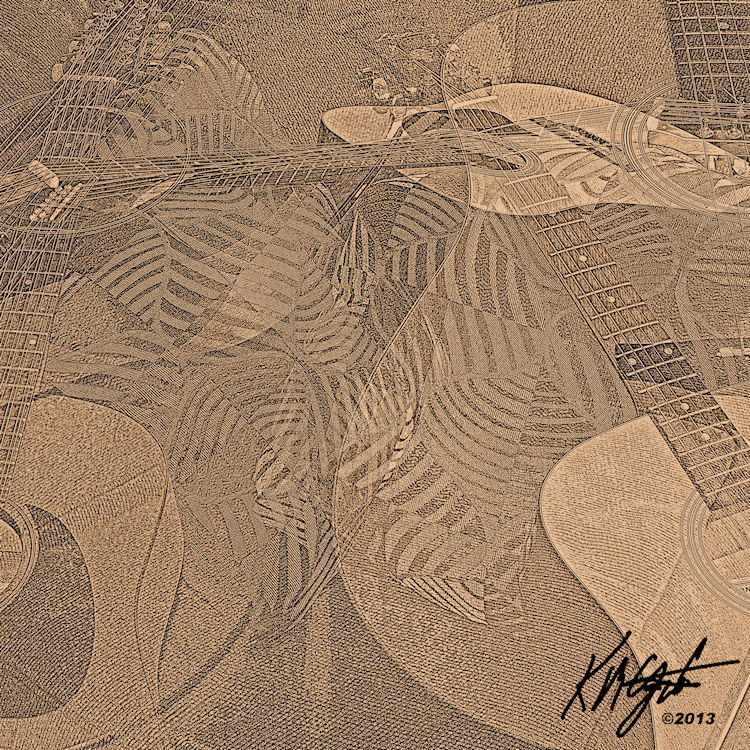
"Digital Collage Guitars Mashup" Corel - Plus - Open G Tuning Instrumental

"Digital Collage Guitars Mashup" Corel - Plus


Today I am sticking with the motif of Guitars. I opened Picasa 3.9 and using the Collage function I browsed to the folder of my Guitars photographs and holding the Ctrl key I selected a number of landscape photographs. Then I chose Create Collage. I selected a Mashup of all the photographs the size of a CD cover 72 dpi with 5120 x 5120 size.

I pressed the key to create the collage. I applied the HDR tool for effect. I used the Pencil Sketch tool to show the outlines of the various guitars making up the overlaid collage. I saved that file. I opened with Corel PhotoPaint. 

There I increased the sharpness with Adaptive Sharpen, to show the strings and headstocks more clearly. I used the Tone Curve to deepen the tones. Saving this iteration I opened with Corel PSP Pro X3.

There I played around with a few Effects and was not satisfied with the results. I applied the Photo Effect Sepia for color. Then I used the Saturation tool Vibrancy to add to the color a bit.

Using the Visible Watermark I added my signature. I saved again. I resized for display on the blog.

Lastnight I was able to find time to play my 12-String in the Open G tuning. I used my Toneport UX1 and the Gearbox software and selected a Clean Guitar tone called "Bad." I turned up the volume and the Bass for the drone of the open tuning.

I found a drumming file I had created from a snippet of real life drumming lasting about 4 minutes. It begins with a Jet Plane like sound that I had made while playing around with sounds, then the drumming comes in.

I opened Audacity and loaded the drum background importing the file. After some playful practicing with the Open G tuning I had a number of chord structures to play with.

I started the recording and built from a softer beginning to a uptempo rhythm. Using the chords I had practiced I recorded for about 4 minutes. I saved as an Audacity Project to my external drive and then converted to an MP3 for playback. I titled it "Late Jet." I saved this MP3 to my Current EP songs titled "Celebrate Now." And using my Headphones for playback I listened to the results. I was pleasantly surprised with the mix. SoundCloud Link:  http://soundcloud.com/gatzka-music/open-g-late-jet


Monday, June 24, 2013

"My Seagull C12 built circa 1990" Still Playing! Corel - Plus

My Seagull C12 built circa 1990


A full length shot of my Seagull C12 Guitar built circa 1990, in it's case, taken with my Canon Rebel XTi. I browsed to it in Picasa 3.9 and opened with Corel PhotoPaint.

There I applied the Local Equalization tool for contrast, and adjusted the Tone Curve for color depth. I used the Art Strokes Watercolor on it for a painterly feel.

I then used Filter Forge's plugin Photo Effects for the Vibrancy, some punch to the native colors. Also from Filter Forge's Frames I added a slight Film frame. I added my signature in white and saved that large iteration.

I opened with Corel PSP Pro X3 and Fit to Screen. I upped the Color Vibrancy once again with the Saturation tool. I Then Added Image Information a title, the artist name and copyright information.

I have been so busy with my Grandson I haven't been playing my C12 much and I need to get back to it, possibly this evening. It's currently tuned in Open G for some fun improvising. I hope to find some time tonight!

Sunday, June 9, 2013

"HDR, High Contrast 12-String Guitar" Picasa - Corel

HDR High Contrast Seagull C12 Guitar


I shot this photograph of my Seagull C12-String Guitar with our Canon Rebel XTi. I am trying to leave the EXIF data available for this photograph. I enhanced it in Picasa 3.9 with some of the tools there available.

I used the Saturation tool turned up as high as I could take it. Then applied the HDR tool for more contrast. I used the Glow tool for adding more light to the HDR. Then I applied the Vignette tool for framing.

I opened in Corel PSP Pro X3 and added my title, Artist's name and copyright to the EXIF info with the Image Information feature. Using the Visible Watermark I placed my signature in the upper right corner for clarity of marking. To finish the image I added some Texture to it using PSP's Effects Texture tool.

If you examine the image closely you can see pick scratches on the front of it below the soundhole. Also some wear on the soundhole surrounds themselves. Some say, as this comes from playing the guitar, that it adds Character to it. I like that idea, not a pristine underplayed guitar but one that has seen its licks and strums.

You can also clearly see my Etching of the Bird and Florals on the Pickguard that I added to it freehand. More Character? Perhaps. But it definitely is MY guitar and has my marks on it! It's my best musical Friend!

Friday, June 7, 2013

"Abstraction Guitars Multiplied" Corel - KPT Collection - Plus

Abstraction Guitars Multiplied


I opened Picasa 3.9 folder of my recent guitars shoot and selected a portrait styled photograph. From Picasa I opened with Corel PSP Pro X3. There I applied the Digital Camera Remove Noise and the Smart Photo Fix. I increased the Vibrancy in Hue and Saturation. I saved this image.

I opened the image with Corel PhotoPaint. Using the capture rectangle tool I selected a portion of the image from the center of the photograph. I copied and pasted, removed the mask, and placed the cutout, in effect dualing the Guitar necks for three pieces and aligned them. I pasted one more and turned it on it's side, placing it on the bottom.

Using the same cutout I pasted and resized the piece and using the property Difference I reproduced and lined them up along the bottom of the image.

I used the Circular capture tool and created the using the property Invert a number of the round circles. At full size I applied the Art Strokes Effect Crayon to the entire flattened image.

I then used the KPT Collection Equalizer and adjusted the transparency. I also adjusted the tiling in KPT Collection, which created the vertical texture of the image. I inverted my signature to white and placed it using the Property Add. I saved that iteration.

I have enjoyed playing my Seagull C12 today in the Open G Tuning. I tuned the strings to the following "DGDGBD." As you strum the open strings you have the G chord. Finding some open chords and flatpicking I strummed and picked the tuning to my delight at the tone of the 12-String Guitar. A creative day indeed.

Wednesday, June 5, 2013

"Acoustic Guitars Hyper Tiling" Corel - KPT Collection

Acoustic Guitars Hyper Tiling


Another photograph of Guitars I've taken, recently manipulated. I opened my folder in Picasa 3.9 and grabbed this photograph of our Seagull and Lyon guitars.

I opened in Corel PhotoPaint and applied KPT Collections filters to create this image. I used Hyper Tiling for the duplication of the strings and sound holes. I adjusted the transparency to allow the Tiling to show through.

I then used KPT Collections Equalizer for an HDR effect. And I added a Lens Flare to the image as well. So the entire image was manipulated with KPT Collections filters.

Here I demonstrated that the use of filters for Manipulation can be rewarding and enjoyable. Sometimes a simple approach to a creative image can yield decent results.

Tuesday, June 4, 2013

"Abstract Guitars Digital Collage" Corel - Paint.NET - Plus

Abstract Guitars Digital Collage


I have used more of the photographs of our 12-String and 6-String Guitars to create another Digital Collage. I browsed in Picasa 3.9 to my folder of a recent guitar shoot and selected three photographs separately for this collage.

I opened the first two with Paint.NET and using the Ink Sketch tool I made them into pen and ink sketches. I copied them to the clipboard and then pasted as New from Clipboard into Corel PhotoPaint. I fit the images together with merging them with the Multiply property. I used the wand tool and selected large dark areas of color and then filled them with a blue gradient with the fill tool.

After I did that I copied to the clipboard the third photograph of the guitar necks crossing each other. I opened as New from Clipboard and applied the Local Equalization tool. Then I used the Art Strokes tool Conte Crayon on it. I copied to the clipboard again and pasted upon the other merged pen and ink, gradient guitar image. I merged those and saved that iteration.

In Picasa tools I applied Warmify to the image for color warmth. I saved that image with a new name. I then used the plugin from Filter Forge Frames film frame to add a light frame, adding my inverted signature to the whole piece saving one more time at the larger size.  I then resampled for display size and saved that.

For a finishing touch I ran Filter Forge's Photo Effect Vibrance on it to add some punch to the colors.

I ended up with a very Abstract Composition of Guitars Digital Collage. I enjoyed the process. I hope you enjoy the results.

Sunday, May 26, 2013

"Let's Talk About Music with Guest C Bret Campbell" Corel - Plus

C Bret Campbell


"Let's Talk About Music with Guest C Bret Campbell"

I watched the show on YouTube and did a full screen capture. I opened it in Corel PhotoPaint and applied the Local Equalization to the image for High Contrast. Using the Tone Curve I added depth to the colors.

I then used the Effects Art Strokes Watercolor with light settings for a watercolor look and feel. I then deepened the colors with the Saturation tool. I used Filter Forge's Frames Film frame to darken the outline of the image.

I did this while listening to the program on YouTube enjoying Bret's music and the chatting of the other guests.


Catch the Show here at this link:

https://www.youtube.com/watch?feature=player_embedded&v=3tMPIQDbqJ0#!

Tuesday, May 21, 2013

"1,100th Post! Grunge Guitars" Paint.NET - Corel - Plus

Grunge Guitars


For today's image I selected a photograph of our two guitars upright, leaning on the couch. I opened from Picasa 3.9 with Paint.NET and used the Ink Sketch tool on the photograph. I ended up with a pen and ink, black and white, image.

I browsed to my Pictures folder on my external hard drive and went to Mayang's Textures. I selected a metal rust texture and loaded it as another layer. Still in Paint.NET, I resized the texture to fit, used the layer property Multiply, and merged the layers, saving that large iteration. I opened the file in Corel PhotoPaint.

I next went to the Internet to find some fonts of paint splatters that I could use for adding to the grunge look and feel. I found Split, Splat, Splodge and WTC Rhesus TT fonts for free use. I applied the paint splatters, and used the Distort, Wet Paint tool for the drippings. I changed the opacity of the splatters showing the background through them for effect of aged splatters.

I used the Filter Forge Photo Effects plugin for Vibrance to add some punch to the colors. Added my signature in white and resampled for display.

I played my 12-String Seagull last night and practiced for a couple hours. Some new chord progressions and a few tunes. Green Day's "Warning," Coldplay's "Clocks," and Emerson, Lake and Palmer's "Lucky Man," (without the synth.) As I get older my calluses don't take long to begin hurting after only a short time, well I blame it on age and FMS.

All in all I really enjoyed my practice on the guitar, and the singing, too.


Friday, May 10, 2013

"Pillow Talk" Corel - Plus

Pillow Talk


Another angle of our two guitars the Seagull C12 and the Lyon 6, taken with my Canon Rebel XTi with Manual settings. I used only the light coming from the nearby window. I cropped the shot in the viewfinder, leaving a portion of the couch and floor visible. Both guitars are crossed at the upper neck balanced on the pillow, thus "Pillow Talk," is the title.

From Picasa 3.9 I opened with Corel PhotoPaint and began by applying the Local Equalization tool to the entire image, for High Contrast. I used the Tone Curve tool to add depth to the colors. I then used the plugins from Filter Forge: Photo Effects Vibrance and the Film Frame for a punch to the colors and a dark frame.

I like the warm bronze and browns of this image. The High Contrasts jump out of the dark frame. Leaving a warm and interesting result.