Pages

Showing posts with label photograph. Show all posts

Monday, May 9, 2016

Step by Step: Bluegrass Guitar Session at the Library" PE5 Plus

Bluegrass Guitar Session at the Library


I have another Guitarists photograph to share after I worked on it digitally. The "Bluegrass Guitar Session at the Library," is the image for today's post.

Working on my computer I opened the large photograph in Windows 10 Photos. I enhanced the image and added some shadows to it, saving it with a new name.

My next step was to open it in Corel Painter Essentials 5 (PE5.) Here I selected the Illustration settings. I grabbed a brush from the Pencils, Pens and Markers called the Thick N Thin Marker Brush. I digitally painted the image as an Illustration.

I then added back in some details, like the strings of the guitars, the hands, and faces, painting by hand using the Soft Cloner Brush. I wanted to add some texture to the image so I applied the Apply Surface Texture tool.

I selected a coarse paper type, adjusting the Lighting with a quiet flesh tone color. This added warmth as well as the texture to the piece. I saved this large iteration at 300dpi using the same name.

Now I opened the file in Corel's PhotoPaint. I adjusted the Hue to 0, the Saturation to 25, and the Lightness to -10. I added my signature layer to the file, sized and placed it and merged the layers. I saved that iteration with a new name.

For my final steps, I used PicsArt. I applied a black lines border Mask from PicsArt. I used the Tool Curves to add depth to the colors just a bit. I saved that file with a new name.

I had used the large file to make changes in PicsArt, so I had to resize the image for display. I did this in Paint.NET 72dpi, 1220 X 813, 75 Compression, I saved this with a new name.

Be sure to click on the image to observe it at the large size for detail and texture. 


Musically, I have been practicing on my new Martin DRS1 6-String Acoustic Electric Guitar, acoustically without amplification. I have been working on accurate finger placement for my chord playing. Along with that, I listen to Backing Tracks from QuistJam on YouTube, playing scales by ear trying out differing keys and leads. It is improving my playing as I do this, really enjoying the time spent.

Monday, April 4, 2016

"NEW FREE Download of 'I Still Remain' on CDBaby!"

Guitar Player Chording D


After a month of having the songs "Open Secret," and "Something Amazing," FREE from CD Baby's site. I selected to change those back to paid downloads and add "I Still Remain," as a FREE download!

I did the Guitar Player Chording D a number of years ago. I recently found this version on our Laptop. I don't remember all the tools I used to create the Image, but I took the photograph myself.

I have been very busy caregiving for a family member. So it has been difficult to create new Artworks. I have been using my Tablet with free to edit photographs from PicsArt App. And using the Blogger App to post some art directly from my tablet..

If you were one of my listeners of "I Still Remain," it should now be available FREE from CD Baby's site. Look to the right panel and click on the Featured Post, click that Link and it will take you to the website where you can get it FREE!


Wednesday, March 30, 2016

"Cup and Teapot" PaintDotNET

Cup and Teapot


A new photograph from Unsplash, free to edit. This one caught my eye. I like the full reddish color of the Cup and Teapot sitting on the checkered towel.

I brought the file into Paint.NET and applied the Ink Sketch Artistic tool. I upped the color and lowered the pen size. I then went to Adjustments, Curves RGB, increasing the depth a bit. I also increased the Saturation to boost the colors to 110.

I went to Effects Photo for Sharpening the image as it has such great depth of field, I wanted the subject to stand out a bit more.

I saved the large iteration after adding my name and the year, with the text tool. I then re-sized the image for display at 72dpi, 1220 X 813 pixels and used 75 for compression. I saved that display size.


Friday, July 24, 2015

"The Simple Sunrise" Canon - Corel

Simple Sunrise

I was up very early just the other day and the Sunrise was very pretty, I put on a light jacket and grabbed my Canon Rebel XTi. Out the door I went. We have new stairs down to our lower deck, I transversed them keeping an eye out for a good shot of this Sunrise.

I took a number of shots simply in Landscape mode and Auto Mode, as it was a bit chilly. I had included the lake, Bald Eagle Lake, in a couple, but it wasn't reflecting enough of the sun and clouds in the water.

I took this Simple Sunrise, composing the clouds and tree tops surrounding it.

Later I opened it in Corel PSP Pro X3 and upped the Saturation Vibrancy by 33. I saved that large iteration after I added my signature. I then Opened it in Corel PhotoPaint to use Filter Forge's Frames adding a Film frame to the image. I resampled to display size and saved in JPEG format.

I kept my approach simple to this image. I like it very much without more processing. I hope you do, too.


Tuesday, December 2, 2014

"Abstract - Beale Street Blues Players" PicsArt - Corel

Beale Street Blues Players


I took this photograph with my Smartphone at Beale Street Ribs, in Fenton, Michigan. This duo was playing Blues with backtracking equipment, and did some originals as well.

I sent the photograph to myself after using the PicsArt App on it to give it the Contours Abstract appearance. I added a light tint to it here as well. After downloading it to my computer I opened it in Corel PSP Pro X3 and added Image Information, and applied the Saturation Vibrancy tool. I also used the golden frame addition here in Images, Picture Frames.

I would have to say that we enjoyed the Live Blues Rock music they played, and gave them a thumbs-up before leaving, accompanied by big smile of approval.


Tuesday, August 12, 2014

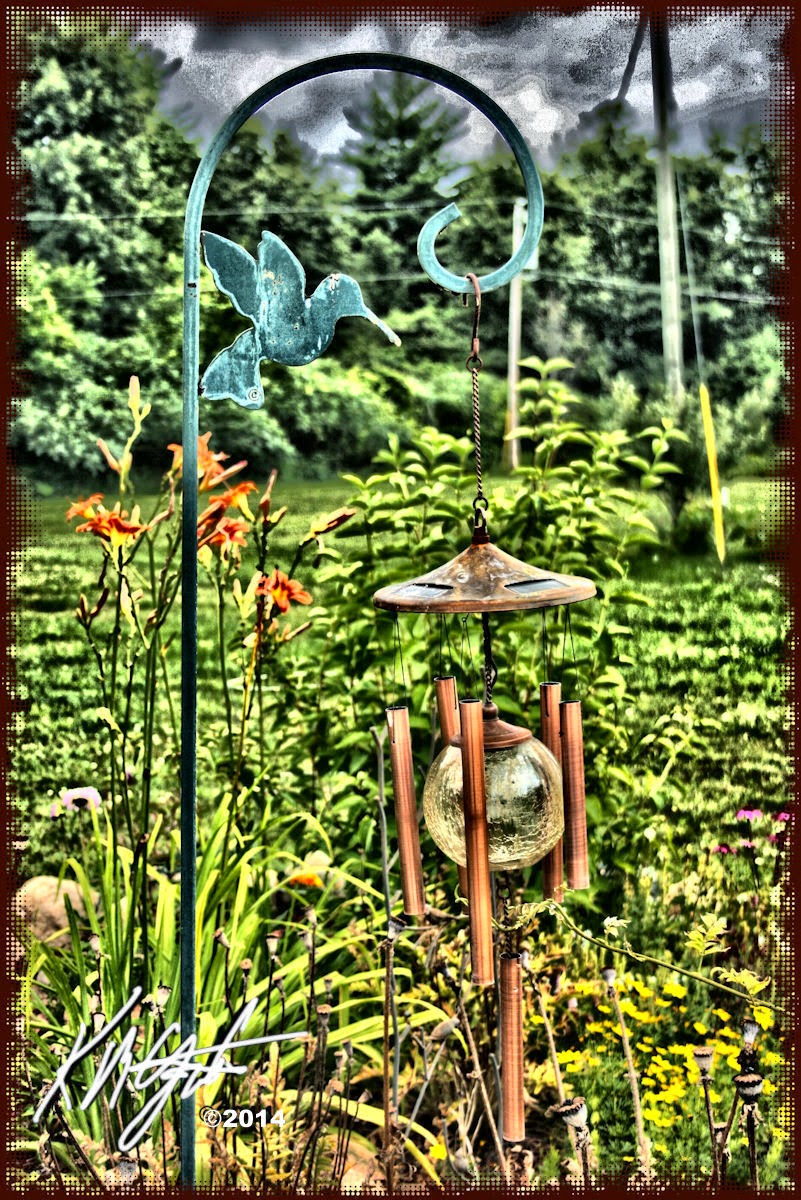
"Hummingbird Hook Globe Chimes" - Corel - "DADGAD Tuning Discussion"

Hummingbird Hook Globe Chimes


I have been very busy this past few weeks. I did this image from a Canon Rebel XTi photograph, taken up North in an area near Clare, Michigan. I opened the photograph in Corel PhotoPaint.

I used the Local Equalization tool on it, then applied the Tone Curve, adding depth to the color. I kept my image processing fairly straight forward. I added a Half-Tone frame with Filter Forge's Frames. I saved the large iteration.

I re-opened the image in Corel PSP Pro X3. Here I upped the color with a Saturation Vibrancy Boost. I added my signature as a layer in Black and then a layer in White. I saved the file in display size for this post.

I also have done some work musically. I now own a used Line 6 Pod XT Live for use with my recording. It is primarily a guitar Pod but I attempted to use the Gearbox software (from Line 6) with it and used a Clean guitar setting for recording with my Shure PG58 Mic.

I played and sang the basis of a DADGAD tune and recorded it with Audacity. Though I am still having some Latency problems with Audacity, but have learned a work around for that until I get my settings right. I then recorded, with my 12-String Seagull plugged in, using a setting called Clean Sweep and laid down a lead track.

I re-plugged in my Shure Mic and did some more vocals in a new track. I adjusted the tracks to match, and Mixed and Rendered to a Stereo file. Saving as a large Wav export and then an MP3 export of a different name.

I shared it with two friends and I have been told it sounded like a late 1960's style tune. Which I don't mind as I like the period of my roots in guitar playing and singing. I was pretty impressed with the results of my experiment with the Pod XT Live and Gearbox, recording with the free source Audacity.


Wednesday, April 30, 2014

"Vintage Ford Rust Orange Truck" Corel

Vintage Ford Rust Orange Truck


Recently one evening I was able to shoot some photographs of a unique Vintage Ford Rust Orange Truck. I shot a number of these at differing angles and because of the evening time I was happy with the exposures.

I uploaded them to my PC and selected the photograph you see here. I opened it in Corel PSP Pro X3. Here I applied the Smart Photo Fix tool, which brightened it a bit. I then used the Saturation Vibrancy tool for a punch to the Blue Sky and the Orange and Rust of the Truck.

I opened my signature file in Corel PhotoPaint and Inverted it to white on black. Saving that I went back to PSP Pro X3 and added the file as a new layer making the black transparent. I also enlarged the signature to fit in the left hand corner. I merged the layers to one.

I used the Image Information tool to review the EXIF info and added a Title, Copyright, Programs used, etc. Next I selected from the Picture Frame tool a ragged edge for the photograph, applied a black border to it and did a Soft Light Highpass Sharpen on the entire photograph.

I have many more photographs of this Truck to share yet. I will be creating other views and styles to them, for your enjoyment. Please remember to click on the image for the larger view and use your F11 key to expand the view in your browser, F11 back to your standard view in your browser.


Thursday, January 16, 2014

"Art Deco Plus Art Nouveau Woman - Arch - Chair - Eyes" Corel

Woman - Arch - Chair - Eyes


I scanned in another Plate from Art Deco Designs / Edouard Benedictus' Book as background for this image. I used my Canon MP495 to scan it into Corel PhotoPaint. I browsed in my Dover Publications Sampler folder in Picasa 3.9 and used an Art Nouveau Mucha type Woman for this interior view with a window.

Also I used Dover Clip Art for the Eyes. I erased around this one Eye and applied the property Multiply to it. I then used the Tone Curve on it, duplicated it and flipped it, so I might have two eyes looking in the Window.

I next opened a photograph of a large style Armchair. I used the Scatter Effects tool on it. Then I decreased its color using the Tone Curve tool. I enlarged both the Eyes and Armchair and Woman to fit the interior background. This made them more prominent in the piece.

I merged them all, and added my signature and copyright, saving the large iteration. I resampled the image for display here.

So I ended up with an image which has many differing styles melded into one. A Digital Collage for this days post.


Monday, January 6, 2014

"Inverted Snow and Trees" Paint.NET - Corel

Inverted Snow - Trees


I have these snow photographs and was discussing black and white versions of them with my oldest, my Daughter. We talked about taking one of the photographs opening it in Paint.NET and sketching it with the Ink Sketch Tool.

I downloaded the latest version of Paint.NET and did just that. As my Daughter is working on black paper with a White curved bridge, I suggested that I would send her White Trees for background work. I used Invert Tool in Paint.NET and altered it for White Trees and Seedum.

Her response was "Cool!" when I sent her a copy of the large file. I suggested she print out the image on Matte Photo Paper and cut it to fit her Bridge image. (Or I may print it out for her.)

I did open the image in Corel PSP Pro X3 and added Image Information: Title, Copyright, etc. I then saved the large file and resized it for display here.

We will see if she uses my suggestion.

Tuesday, November 12, 2013

"Journey Through My Journals Continues" Corel, Canon

Freehand Young Lady Pencil Drawing

Three Freehand Faces on Colored Paper

Stone Village Evergreen Trees Printout


I keep finding differing images in my Journals. I have a Portrait of a Young Lady, done freehand in Pencil to share. Scanned in with my Canon MP495. I also have Three Freehand Faces on Colored Paper, the paper being dark red but the scan went pink on me, go figure scanners and settings. The last one is a photograph of Evergreen Trees taken at the Stone Village in Jackson, Michigan, years ago.

I used Corel PhotoPaint and Corel PSP Pro X3 for these. I did some slight adjustments for clarity. I am enjoying this trip through my Journals and am constantly surprised at what I find. I had completely forgotten the Freehand Pencil Drawing of the Young Lady. I was glad I found it again to share. Such a simple exercise in drawing, and such a nice result, in my humble opinion.

After some adjustments I had done to these cropped images (cropped during scanning,) I saved the large iterations after adding some Image Information in PSP Pro X3. Then I resized them for display.

Notice anything different? No 2013 Signature, These were done circa the 80's and 90's. I would not care if anyone shared them. But would request that credit be given to me as the Artist, thank you.


Friday, October 18, 2013

"1990 Circa Digital Visual Art - Retrospective"

Foliage and Woman

Young Woman


I am still getting my PC back to health with an OS upgrade and driver compatibility issues. So I am sharing some of my earlier Circa 1990's Digital Visual Artworks.

"Foliage and Woman," is full of computer color. A beautiful face along with the surrounding florals and leaves. This was probably done with Corel PhotoPaint (an early version.)

"Young Woman," was also done in PhotoPaint with Tinting and softening. I remember taking this photograph of the young lady so long ago. A contemplative expression that I see as delightful. Her Mother was suffering from Cancer at the time and it shows in her countenance. Since then her Mother has been "in remission," up to this day, after surgery, chemo, and radiation. Last time I saw this gal she is a happy Mother herself now.

I am approaching the end of my sojourn through the OS upgrade and I will continue to share older works for a little longer. Please view it as a Retrospective of my early work. Thank You!


Sunday, October 13, 2013

"Searching the Archives - Vintage Dot Matrix and Photograph"

Amelia - Dot Matrix Digitized

Film Photo Scanned In


I am showing a Vintage Dot Matrix Female Portrait to begin with. I did this on a Tandy Color Computer with a Dot Matrix printer. I scanned in the results and saved them for future examination. It may bring back some memories of those of you in the early days of home computing. Amelia was a fictional person I drew on the computer using a Kola Pad if my memory serves me right, if not it was a mouse drawn image. In fact this may have been done on an Amiga Computer! Memory fails me.

Candy Apples is a film photograph taken in the 1990's and scanned in. I think I was using Windows at the time on an IBM type PC. I do remember this trip to the Ingham County Fair near Lansing Michigan.

Memories for all to conjure up thoughts of early computing!


Saturday, August 31, 2013

"Leftovers from the 2013 Dream Cruise" Collage - Picasa - Corel

Vintage Tidbits Collage


I had some more photographs left over from the 2013 Woodward Ave Dream Cruise, I opened Picasa 3.9 and selected four, two with headlights, two back ends, of some of the cars I had photographed.

I picked build Collage in Picasa, made some appropriate selections for the Digital Collage and had Picasa make it. Being that the overall collage was a large piece I opened Corel PhotoPaint and resampled to a workable size.

Once in PhotoPaint I applied the Adjust, Local Equalization tool for texture and an HDR look. Getting back color depth and punch I used the Tone Curve Luminosity curve and pulled it down in the center of the graph. Then I selected Effects, Filter Forge's Photo Effects, Vibrancy for additional punch to the colors.

I saved that iteration and opened with Corel PSP Pro X3. Here I applied the Sharpen High Pass Sharpen Overlay. Back in PhotoPaint I added my signature in white, and saved again with some compression for display.


Sunday, August 25, 2013

"2013 Woodward Ave Dream Cruise V" Corel PSP Pro X3

Ford Fairlane 500

Vintage Custom DeSoto


I have two more photographs I wanted to share with you from the Detroit Metro Woodward Ave Dream Cruise of 2013.

I shot a Red Ford Fairlane 500 Convertible as well as a Vintage Custom Blue DeSoto. I opened the photographs in Corel PSP Pro X3 and made a few adjustments.


  1. Digital Camera Noise Removal
  2. Smart Photo Fix
  3. Saturation Vibrancy for punch to the color
  4. Sharpen High Pass Sharpen Soft Light
  5. Backlighting light setting
  6. Image Information - Title and Copyright information
  7. Visible Watermark for my signature


This is the basic workflow I used on both photographs for enhancing them in PSP Pro X3. I have been relying on PSP more for my basic adjustments and try to keep them to a flow that works to make the photographs appear better. Sometimes the original exposures need a little help.

I hope you have enjoyed the photographs of the 2013 Dream Cruise.We saw many cars speeding and peeling out and the noise was amazingly loud as they did. We took a little trip a further down South on Woodward but hit a huge back up of cars and decided not to wait in the jam of it all. So we did not make it down to the MoPar section of the Cruise.


Wednesday, July 31, 2013

"Myself and 12-String Self-Portrait - Ink" Corel - Paint.NET

Myself and 12-String Self-Portrait - Ink


I was working with my Logitech C260 Webcam today and snapped this Selfie. I opened it in Corel PSP Pro X3 and adjusted with the Smart Photo Fix, some color and sharpening. I used the Skin Smoother on the image. The I added the frame and signature. I saved that iteration.

I opened with Paint.NET and applied the Effects Artistic Ink Sketch. Boosting the color a bit and increasing the Ink size to 70. This gave me the line work in the piece. I would say that the only thing I may have done different is the signature, as it has ink "artifacts" all around it. But not so many I am that concerned.

I still have my Seagull C12 tuned to Open G and will be trying other open tunings soon, perhaps today for a time of practice and fun.

I have found an Alt Tuning website at: http://www.howtotuneaguitar.org/tuning/drop-c/ for alternate tunings, in this case Drop C. I love to experiment with making up chords from other tunings by sampling the sounds within the alternate ones. Or I even make up chords, and play scales by ear for the learning experience. It's a challenge I really enjoy on the guitar.


Tuesday, July 30, 2013

"Ground Cover, Black-eyed Susans and Stones" Corel PSP Pro X3

Ground Cover, Black-eyed Susans and Stones


Another photograph from our garden taken with our Canon Rebel XTi. Ground Cover, Black-eyed Susans and Stones, are the subject.

I browsed with Picasa 3.9 to this folder and picked this photograph for today's post. I opened with Corel PSP Pro X3.

I used the Smart Photo Fix feature, increasing the color and sharpness. Then for a punch to the color I used the Saturation tool Vibrancy setting at about a third. I applied the High Pass Sharpen tool for details.

I kept my approach simple for my adjustments in digital processing, the Blue of the wall in the background stands out as well.

I saved the large iteration after using the Visible Watermark to add my signature. I then resized for display on gatzkART!.

Saturday, July 27, 2013

"Stones Dirt and Flowers" Picasa - Corel PSP Pro X3 - Plus

Stones Dirt and Flowers


Stones Dirt and Flowers, is the title of today's image. Another floral photograph from our garden. The purple flowers just planted themselves there and grew next to the Black-eyed Susans.

After I selected this shot I used Picasa 3.9 HDR tool and adjusted the radius a bit. Then I applied the Lomo effect in Picasa. I saved that and opened the photograph in Corel PSP Pro X3.

Here I adjusted the Curves for depth, and Saturation for Vibrancy (about a third.) It really brought out the purple flowers and subdued the yellow of the Black-eyed Susans.

I saved that iteration. I opened with Corel PhotoPaint to add my signature in White. I saved that and reopened in PSP Pro X3 to adjust the size for display and add some information to the EXIF data. I saved again.

The Guitar motif will have to wait until I get the bug again, which won't be long.

On an interesting note gatzkART! has surpassed 110,500 Pageviews this week! Thank you for your views and interest in the workflow.

Friday, July 26, 2013

"Echinacea and Daisies with Ground Cover" Corel PSP Pro X3

Echinacea and Daisies with Ground Cover


As we finished our walk with our Grandson I took some photographs of our garden flowers. I used the Portrait setting on my Canon Rebel XTi DSLR for some softness to the photograph. I opened Picasa 3.9 and browsed to that folder and selected this photograph. I opened with Corel PSP Pro X3.

I liked the Echinacea and the Daisies with the Ground Cover together. In PSP Pro X3 I used the Smart Photo Fix, brightening the colors a bit. I then used the High Pass Sharpen with Soft Light blending.

I applied Saturation Vibrancy at 12 for a punch to the colors. Using the Visible Watermark I added my signature. I saved the large version and then resized for display here.

I did not leave PSP Pro X3 for any other adjustments to the basic floral photograph.

Wednesday, July 24, 2013

"Unique Stone Covered Mail Box" Corel PSP Pro X3

Unique Stone Covered Mail Box


Took a walk around our neighborhood with our Grandson today. We have been very busy lately and a slow steady pace with a three year old was wonderful. The sky was partly cloudy and the temperature just right for a stroll.

I took my Canon Rebel XTi with me and captured a few  florals and this image of a Unique Stone Covered Mail Box. I avoided the side with the postal number and flag on it as this was the most interesting view. I took a couple of different exposures and selected one to open in Corel PSP Pro X3.

I made only a few adjustments. I used the Digital Camera Noise Removal tool, then the Smart Photo Fix increasing the color a bit for the stones on the mail box.

I tried using the Saturation tool at Vibrancy but it was too false in the colors so I rejected that use of that tool. I did apply the High Pass Sharpen effect for the lines in the wood post. I added my signature and a gold Picture Frame in PSP Pro X3.

A simple photograph that is curious as an object you don't find that often, an all stone covered mail box.

I departure from my guitars motif, but there is always time for that!

Tuesday, July 16, 2013

"Thunderstorm and Internet Outage - Seagull C12 Digital Collage" Paint.NET - Corel

Digital Collage Seagull C12


Had another Thunderstorm and the power went out. I was offline and had powered down my system before that so I spared my equipment some electrical harassment. But after the storm passed - now - no Internet from my ISP! The travails of the current age.

So I drank a cup of coffee, half decaf and half regular and settled in at my workstation. I plugged in my External drive and browsed the folders in Thumbnail view looking for guitar photographs.

Finding some I made my selection, my Seagull C12 sideways (horizontally.) I opened the file with Paint.NET and applied the Ink Sketch with no color and a setting of 28 for the ink pen. I Then saved this large version to my local workstation.

I opened the file with Corel PhotoPaint and began creating some Masks that allowed some pasting of a skyline and a blue gradient into the piece. I also used a woodgrain fill for the guitar body mask. I played around with pieces of the guitar making an unusual looking instrument.

Selecting another photograph of my guitar I cut it out with the lasso tool and copied and pasted it into the collage. I applied curved feathering to the object selection and duplicated it in differing sizes for balancing out the composition.

I saved that iteration to my workstation and opened with Corel PSP Pro X3. Here I increased the Saturation using Vibrancy upping the color threshold. I applied my signature with the Visible Watermark tool. Then I selected the Picture Frame Cyanotype and framed the image.

I saved that iteration and resized for display in PSP Pro.

As I post this my Stereo Amp died a popping death! Now using old OEM Speakers, Can't use my Toneport for recording or playing back, it is unplugged. Bummer!