Pages

Showing posts with label Audacity. Show all posts

Saturday, September 26, 2015

"Wedding Song - Dream Has Come True"

https://soundcloud.com/gatzka-music/dream-has-come-true-wedding-song

The Couple


I have mentioned this song in my last post, the Wedding Song "Dream Has Come True," for our Son and new Daughter in law. It was played and presented at their wedding reception. My wife and I were surprised by the enthusiastic applause we received from all there.

It is short, 2:25 Minutes, have a listen!

Congratulations to our Son and his new wife!


Sunday, July 26, 2015

"New Song on SoundCloud - Come With The Tide" Audacity

Go to this link below for the Song:

https://soundcloud.com/gatzka-music/come-with-the-tide

Come With The Tide
Come With the Tide
©2015 Kirk Mathew Gatzka

As we view the far, far horizon
We can't help but look and see
That the waters go on the wizened
And that's the way that it's gonna be.

The waters go on and on and on
The rivers, seas, flow to the ocean
Our knowledge is only so free
And our wisdom is only a notion

Come with the tide
The waters are a rising
Come to my side
As we run on to the shore sizing

We tumble down on the high beach
Laughter is loud with despair
We both want to know how to be reaching
For the time when all in all is repaired.

We look to the West sun a setting
We look to the dark waves of the sea
We see that the East sky is blackened
We wish to set sail, easy and free.

As the fire and storm is behind us
We find our great ship nestled at bay
Baggage loaded, sails are a thrusting
To the East not a bad wind is blowing
As we happily set sail away.

The waters go on and on and on
The rivers, seas flow to the ocean
Our knowledge is only so free
And our wisdom is only a notion

Tuesday, May 19, 2015

"Tear The Curtain Down - New Song" SoundCloud

https://soundcloud.com/gatzka-music/tear-the-curtain-down

Tear The Curtain Down
My newest song, it is 8+ minutes long, reminiscent of Neil Young. Just Vocals and my 12-String, recorded in my Studio/Office Live. Not much in the way of mixing. Kept it simple.

NOTE: "Wait Until Morning," now available on CDBaby for Full Preview and Listening, after a short delay! 

Scroll to the Link below or the the Music Store towards the bottom and select songs for Previews. Listen before considering a purchase!

Thursday, May 14, 2015

"New Song 'Wait Until Morning' Now Available" CDBaby

http://www.cdbaby.com/cd/kirkmathewgatzka10


"Wait Until Morning" is a love song. Two parties are trying to keep a relationship together, but are having difficulties. "You show me your answers, I'll show you mine," shows that they are discussing attitudes and thoughts about being together. The first party (the male singing,) wants to stay until morning. Hoping to express his commitment. But is he really committed to this relationship?

We don't really get to hear the other side of the situation, but, "if you don't mind," shows reluctance on her part to let him stay. The end of the matter is they don't stay together and the relationship is a bust. That's for another tune I suppose. Click on the link above for a Full Preview for your consideration. Thank you for listening!

Wednesday, February 25, 2015

"New Song: 'Art for Arts Sake' now available on CDBaby"

http://cdbaby.com/cd/kirkmathewgatzka5

CDBaby MP3 For Sale

I have a series of songs coming up in March. Each one as a single, that you can listen to the full song before considering buying. As for today, I just added the newest song here and on Facebook. You will find "Art for Arts Sake," to be an upbeat tune, just vocals and my 12-String. I call my genre Alternative Folk/Rock. Click and have a listen!

As always hope you like what you hear! Thank you for your looking into my Music as a Singer-Songwriter!


Friday, February 6, 2015

Kirk Mathew Gatzka | Hook Line & Sinker | CD Baby Music Store

Kirk Mathew Gatzka | Hook Line & Sinker | CD Baby Music Store


Go to CDBaby and listen to the full song now, instead of a clip. 

This song was actually inspired by a singer/songwriter discussion about "hooks" in our songs. How we use them and if we do or don't. It readily came to my mind as I sat and wrote it. The later part of the song says, "you set the hook," just like fishing for trout or bass. 

Kirk Mathew Gatzka | Open Secret | CD Baby Music Store

Kirk Mathew Gatzka | Open Secret | CD Baby Music Store


Wednesday, August 20, 2014

"Trellises Bark Siding Shed" Corel - Audacity and Line 6

Trellises Bark Siding

A simple post today. A touch of workflow. I took this photograph near Clare, Michigan, with my Canon Rebel XTi. I opened it in Corel PhotoPaint. There I applied Local Equalization and used the Tone Curve for upping the color depth a bit.

I opened the saved large iteration in Corel PSP Pro X3 and flipped the photograph. I added Vibrancy with the Saturation tool. I also added a layer of my signature in white, which doesn't detract from the image a bit. I adjusted the size for display here and saved the medium file.

I have been experimenting with my Music using my Line 6 PodXTLive, and the Gearbox software. I used a drum backtrack that was fast rock and a beginning sound like a jet taking off. I had opened this in Audacity. I recorded E7 A7 B7 riff and also a Am Em G D riff on a subsequent new track with a differing beat. In other words I played around with two drum tracks and used a Clean guitar tone called "Clean Guitar Tone," to lay down a rhythm track through the Pod.

I used a different tone for the lead playing on both tunes. On the Am tune I used the tone Avenge-fold Seven. And on the E7 tune I used a Blues tone setting.

I played the leads, adjusted the timing in Audacity due to the Latency. I ended up with two fun tracks without vocals for my own enjoyment. I am getting used to the PoDXTLive and like it quite a bit thus far. I don't currently have the funds to purchase DAW Software so Audacity is my choice above other free recording software. For a free recording type of software it is very good to use. One of the best in my humble opinion.

Saturday, November 2, 2013

"Brown Haired, Green and Violet Eyed Young Woman" Corel - Mayang's Textures

Brown Haired Green and Violet Eyed  Young Woman


Yet another Pen and Ink and Pastel image of a Brown Haired, Green and Violet Eyed Young Woman. I am sharing these from my Journals of freehand drawings and poetry.

I used this scanned in drawing and layered it with one of Mayang's Textures, a eucalyptus tree bark texture, very mild and it adds to the overall image.

I used Corel PhotoPaint to layer the texture adjusting it's property to Multiply and it's opacity as well. The drawing I had applied the Tone Curve for a punch to the color and some depth.

Musically I have been having trouble with my Line 6 Toneport UX1 and my Fisher receiver/amp for recording. Last night I found the song "Killing the Blues," known by it's recording by Robert Plant and Allison Krauss. I attempted to record it and got a fair take. I set my Gearbox software for the microphone to "Warm and Clean," so it was a little bassy for me. Next try I will use "Bright and Clean," to see if that makes a difference.

I exported it as an MP3 and it sounded a bit muddy. I am having a lot of trouble with the Gain on the Toneport, too low and nothing to record, too high and I get distortion in the background. It is so touchy since a power surge zapped my equipment. I still can get it to work though, I tried plugging the microphone directly into the computer's motherboard sound card and it was absolutely terrible! So I began to play with the Toneport, Gain, Volume, Gearbox settings, etc., again. I will find that balance some place in the settings!

I also am getting familiar with Win 7 32-bit's setting for recording and playback. It too is very touchy, but I hope it proves up to the task so I can record some Covers and possibly some new original songs.

Doing the recording helps me practice and see how I am doing in singing and guitar playing, Practice!


Saturday, August 3, 2013

"Yellow Floral with Ground Cover" Corel - Plus

Yellow Floral with Ground Cover


From our Garden another floral photograph. I browsed to the folder in Picasa 3.9 and then opened with Corel PSP Pro X3.

I applied the Smart Photo Fix feature, increasing the color. Added some punch to the color using Saturation Vibrancy at about a third. I then applied the Sharpen High Pass Sharpen Soft Light.

I saved that iteration. I resized for display and saved again under a differing name. Then I reopened with Corel PhotoPaint to add my signature in white, something my PNG files haven't let me do yet in PSP Pro, my fault no doubt.

I saved for gatzkART! and did this blog post for your enjoyment.

Guitar wise I was playing my 12-String Seagull and had it tuned in Open C Tuning. I made up some chords and rhythm and "Nonsense Words" and titled the song that.

Even though my amplifier is shot I can reroute my headset line through my PC Stereo Speakers; into my Line 6 Toneport UX1 and I recorded it in Audacity. I recorded the guitar first and then the words and made up the melody as I went. I saved as a project for further adjustments and exported as an MP3. I may put it on SoundCloud, but it was just for fun.


Tuesday, June 25, 2013

"Digital Collage Guitars Mashup" Corel - Plus - Open G Tuning Instrumental

"Digital Collage Guitars Mashup" Corel - Plus


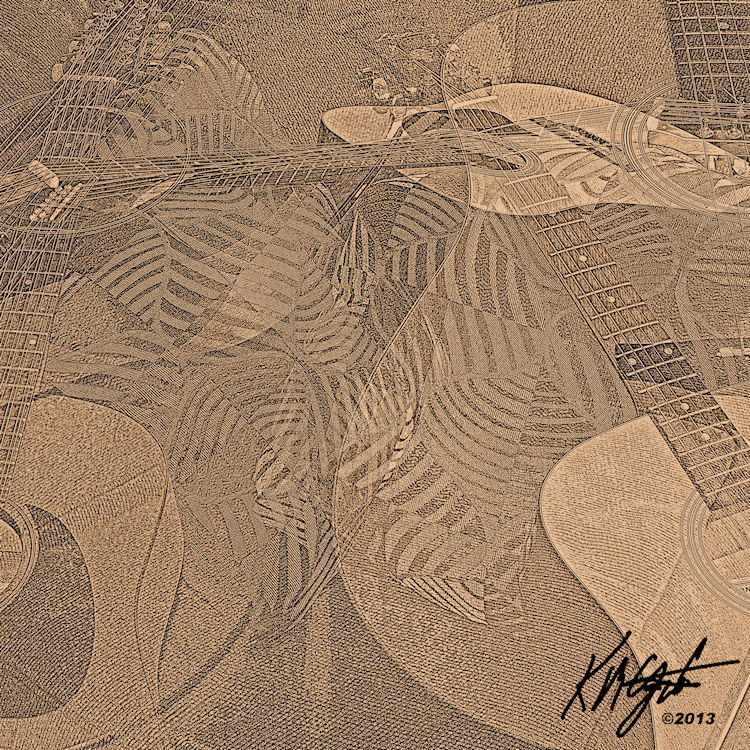
Today I am sticking with the motif of Guitars. I opened Picasa 3.9 and using the Collage function I browsed to the folder of my Guitars photographs and holding the Ctrl key I selected a number of landscape photographs. Then I chose Create Collage. I selected a Mashup of all the photographs the size of a CD cover 72 dpi with 5120 x 5120 size.

I pressed the key to create the collage. I applied the HDR tool for effect. I used the Pencil Sketch tool to show the outlines of the various guitars making up the overlaid collage. I saved that file. I opened with Corel PhotoPaint. 

There I increased the sharpness with Adaptive Sharpen, to show the strings and headstocks more clearly. I used the Tone Curve to deepen the tones. Saving this iteration I opened with Corel PSP Pro X3.

There I played around with a few Effects and was not satisfied with the results. I applied the Photo Effect Sepia for color. Then I used the Saturation tool Vibrancy to add to the color a bit.

Using the Visible Watermark I added my signature. I saved again. I resized for display on the blog.

Lastnight I was able to find time to play my 12-String in the Open G tuning. I used my Toneport UX1 and the Gearbox software and selected a Clean Guitar tone called "Bad." I turned up the volume and the Bass for the drone of the open tuning.

I found a drumming file I had created from a snippet of real life drumming lasting about 4 minutes. It begins with a Jet Plane like sound that I had made while playing around with sounds, then the drumming comes in.

I opened Audacity and loaded the drum background importing the file. After some playful practicing with the Open G tuning I had a number of chord structures to play with.

I started the recording and built from a softer beginning to a uptempo rhythm. Using the chords I had practiced I recorded for about 4 minutes. I saved as an Audacity Project to my external drive and then converted to an MP3 for playback. I titled it "Late Jet." I saved this MP3 to my Current EP songs titled "Celebrate Now." And using my Headphones for playback I listened to the results. I was pleasantly surprised with the mix. SoundCloud Link:  http://soundcloud.com/gatzka-music/open-g-late-jet


Sunday, June 5, 2011

Grunge Guitars - Gaussian Blur - Paint.NET -PhotoPaint


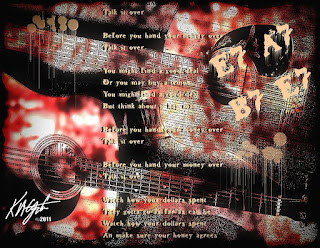
A return to a grunge guitar motif for today's image. I opened my Picasa 3 folder of Flaming Pear texture tiles and using the Collage feature created a collage of some of them. I selected the resulting collage and resampled it for a working size. I opened with PhotoPaint and applied the Tune Blur Gaussian blur to the textures. Then I made then into a Tritone and converted it back to RGB. I applied the Local Equalization to that for a high contrast background image.

I browsed to one of my guitar photograph folders and selected one of two guitars on an angle. I opened with Paint.NET and used the Effects> Artistic> Ink Sketch> tool with the color turned down and the ink up a bit. I resized that to a size similar to the background I had in PhotoPaint. I copied it to the clipboard and pasted it on top of the tritone background. I sized to fit. I used Filter Forge's frames for a film frame.

I added some dripping paint splashes and the text to a fun, bluesy lyric entitled "Talk It Over." I added the basic blues chords E7 - A7 and B7 to the image as well. Here is the lyric:

Before you hand your money over
Talk it over

Before you hand your money over
Talk it over

You might find a good deal
Or you may buy a lemon
You might find a good deal
But think about it hey man

Before you hand your money over
Talk it over

Before you hand your money over
Talk it over

Watch how your dollars spent
They gotta go as far as can be
Watch how your dollars spent
An make sure your honey agrees

If you don't watch your money
Someone else will be

If you don't watch your money, honey,
Someone else will be

Before you hand your money over
Talk it over

Before you hand your money over
Talk it over

It's OK to laugh at the lyrics, they are meant to be fun! As any married couple may know it takes two to make a budget and stick to it! So before that purchase, talk it over, can you really afford it? I hope you can.

----------------
Now playing: Kirk Mathew Gatzka - Talk It Over
via FoxyTunes

Saturday, July 24, 2010

Henri Matisse - Master Colorist


Today's post is about Henri Matisse [click here] a contemporary of Picasso. He is one of my favorite painters, high on the list. Here you see a piece done by me freehand on gessoed packing paper with pastel pencils and soft chalks. I scanned the image in at 600 dpi and opened the tif file in Painter 8. There I cloned the image and painted it with impasto brushes.

I did not alter the tone or saturation at all as the colors came through clear in Painter. I resampled the file in PhotoPaint as it is a 101 megabyte 8" x 11" image. Here it is a smaller jpg version for display on the web. I really enjoyed working on this in pastel on the gessoed paper. Adding the impasto brush strokes was also fun to do.

Matisse is known for his painting from Impressionistic to Fauvism on to his paper cutouts later in life. He was prolific in producing marvelously colored works. His sketches are also famous for simple lines designing beautiful subject matter.

To me he is a Master colorist and I thoroughly love his decorative approach to painting. I include one of my favorite pieces here that I found on the internet, resampled for display here.

This is only one example of his use of color and line and appeals to me because of the inclusion of the guitar. Please see the above link for Biographical information and more of his Art work.

I continue to play in the DADGAD Tuning on my 12-string. I did some recording through my Toneport selecting an Archtop Jazz guitar style in the Gearbox software.

The recording came out too full of bass and not enough treble for my taste so I did not keep the recording. I am going to try using only the Shure PG58 microphone to record with a clearer vocal tone selection to see if I can capture the truer tones of the 12-string. I did try to alter the pitch a bit higher in Audacity but it sounded fake, so I decided to re-record at another time.

Albright-Knox Art Gallery, Buffalo
115 x 115.1 cm.
1939

Saturday, May 29, 2010

White Lilies - Watercolor - Painter 8


We went on an outing to the local greenhouse here called, "WoJo's." I though I'd take my camera along and get some new photographs of flowers, though we went mostly for our vegetable garden. I found plenty of color and variety there.

These white lilies were among the photographs I really liked for doing a watercolor painting.

I first prepared the photograph by adjusting the Tone Curve in PhotoPaint. The shadows needed to be lightened. I saved that file.

Opening it in Paint.NET I applied one of the paint filter plugins which simplified the details somewhat and gave it a painterly appearance. I then saved again and opened it in Painter 8.

Once there I cloned the image and cleared it and turned on the Tracing Paper. From there I selected the Watercolor brushes and adjusted my opacity, diffusion, and varied the size of the Camel brush. I painted each petal individually and the white watercolor grayed somewhat, which was fine with me as I liked the result. I also painted the pistils and the one bud waiting to bloom.

I created a New Watercolor Layer and proceeded to paint the background keeping it light as much as I could for transparency and grain. I then went back to the original layer and selected the Digital Watercolors and added the yellow to the petals. I applied the soft cloner to the pistils for more detail, and blended with it as well. I saved that file.

Back in PhotoPaint I added the Filter Forge's Freepack 3 - Frames watercolor frame and also added some additional framing using Papersize with varying pixel width.

Last night I was working on a new song. Another broken relationship tune. I am not certain I like it as yet but am still working on it. I am using the chord progression of Em A for the verses, D G D A for the chorus, with a bridge of Dm7 Fmaj7 G7 Dm7 Fmaj7 G and turnaround back to Em A for the last verse. I recorded my first version in Audacity and saved it for my mp3 player.

----------------
Listening to: Eric Clapton - After Midnight
null

Tuesday, May 11, 2010

Two Young Ladies - Painter 8 Wow! Book Brushes


This painting is done in Painter 8 based on a work I did some time ago reworked in Painter. I titled it "Pucker" because the lips are slightly puckered.

I used Painter 8 Wow Book's acrylic brushes and grainy brushes for this piece. I took the eyes, eyebrows and lips from the original image using the soft cloner brush for details. As I also highlighted the buttons that frame the image with the soft cloner.

I wanted to do some more painting with Painter 8 so I approached this image from that perspective. I did used PhotoPaint to increase the dpi to 96 and sharpen the original. Then used the stamp tool with the selected brushes described above. It is more painterly than some of my other pieces of work, but that was the goal.

The second image is from a photograph taken by my son Keir M. Gatzka. I opened the image in Paint.NET to apply the oil painting filter for my underpainting. I saved it as a tif file format. And I applied the Curves to it to deepen the color and shadows.

I reopened it in Painter 8, using the Wow! Book brushes I painted the piece with another broad based underpainting and then added details with finer oil brushes. I love the realism in this image as I usually go for a looser feel. I really like the smile of this young lady.

I saved the tif file and opened it in PhotoPaint. I only added the grunge frame using Filter Forge's Freepack - Frames again along with my signature. Converting it to jpg for display here.

I worked on a song titled, "Pages Without Numbers" yesterday. I recorded a simple vocal and 12-string guitar with a background vocal as well in Audacity. I used two vocal settings for my PG58 Shure microphone in the Gearbox software from Line 6. One was a Detroit R&B vocal for the guitar and background, and the other one for the main vocal - Bright and Clean. I'm not truly satisfied with the recording as I listen to it today. It is kind of muddy sounding on the background vocal. I need to re-record it for clarity.

Listening --- Pages Without Numbers --- Kirk Mathew Gatzka

Wednesday, April 14, 2010

Dual Colors - Grunge Guitars


Another digital collage of grungy guitars on rusty painted metal. I used PhotoPaint to combine two colored rusty painted metal textures to create the background. I got the textures from CGTextures.com.

I applied the Little Ink Pot's Thredgeholder to the guitar photograph for the grungy lines. Then I added a bit of lyrics and chord progression plus the paint splatters with dripping using the Effects> Distort> Wet Paint> filter.

I was working on a new song titled, "I'm Banking on You." It's a slow rock piece. with a chord progression of C/G D/F# E and Cmaj7 E. I used a heavy guitar setting in Gearbox for the lead which has a bit of feedback with it. It's only a 3 minute song shorter than my usual fare. I don't have a drum back beat for it, just 4 tracks of rhythm, lead, background vocals, lead vocal. Done in Audacity I saved it as an MP3.

Listening to - I'm Banking on You - Kirk Mathew Gatzka

Friday, March 26, 2010

Trial 30 Days with Adobe Lightroom 2


I downloaded the trial copy of Adobe's Lightroom 2 yesterday and decided to give it a try. What can it hurt? 30 days of trial and error to play creatively with.

Only problem is I don't remember all the settings I changed doing this current vintage Dodge Truck photograph. I know I changed the Tone Curve, and I changed the contrast and saturation but don't ask me how I did it.

Anyway this photograph was taken some time ago and I have many versions of the truck. I like this one because of the light on the foreground. And the depth my changes in Lightroom made to it really takes the viewer there. It was a bright and sunny afternoon, so the truck was partially in shadow and in the light. I tried to enhance the effect in Lightroom. Take a look at the larger image in your browser and I think you'll agree.

I was also finding time for some recording again yesterday. I used my 12-string and the Toneport UX1 with Gearbox and Audacity. I did two instrumentals, one with a drum backbeat, uptempo, and another without. The second song I played is very light and soft for my playing. My wife liked it, so I guess it must be OK. She is my best critic, I am always hard on myself, I hear all the little mistakes. I truly am an amateur! But I enjoy it so much.

I did post a song for critique on The Acoustic Guitar Community I belong to. I don't know if you have to be a member to download the MP3 of "The Last Good Cowboy" or not. But here is a link to the discussion about the song and one of the comments has a link to the song's MP3. If you would like to hear it go HERE.

If you must join to share I don't have anywhere else to place the MP3'S at this time for storage online. Any suggestions would be appreciated.

----------------
Listening to: Kirk Mathew Gatzka - The Last Good Cowboy
null