Pages

Showing posts with label KPT Collection. Show all posts

Saturday, November 23, 2013

"Freehand Drawing Retro Pencil Sketches" Corel - Canon

Blunt Cut Hair Woman Pencil

Large Eyes Man Pencil

MAC - Amiga - IBM Computers on Iceberg

Not much to explain in the way of workflow on these Retro Pencil Sketches. I scanned two of them in with my Canon MP495 and captured the third with my Canon Rebel XTi camera.

Some adjustments made in KPT Collection, Corel PhotoPaint, Corel PSP Pro X3; in regard to sharpness and clarity and size for posting. As you can see the Pencil Sketches are from 1998 and I don't recall the original date of the Computers Sketch.

I wondered about where my thought process was when I added the Three Competing Computers on an Iceberg! Go Figure! Computing power has come a long way since this MAC and Amiga and IBM PC!


Saturday, June 29, 2013

"Guitar Soundholes with Lutes" Corel - Plus

Guitar Soundholes with Lutes


Would you believe that I did this image of Guitar Soundholes with Lutes in so many steps I did not track them all! I used two Photographs taken with our Canon Rebel Xti of our guitars.

I worked on the image in these following programs, altering, cutting, pasting, and adding texture. But I can't remember all the steps I used, only the Programs:


  • 1. Picasa 3.9
  • 2. Corel PhotoPaint
  • 3. Corel PSP Pro X3
  • 4. KPT Collections
  • 5. Dover ClipArt (Lute)


I usually share the process better than this and I must apologize for not keeping track of my workflow in this instance. I just created the image as it flowed out.

Sometimes the process of creating just goes that way.

Friday, June 7, 2013

"Abstraction Guitars Multiplied" Corel - KPT Collection - Plus

Abstraction Guitars Multiplied


I opened Picasa 3.9 folder of my recent guitars shoot and selected a portrait styled photograph. From Picasa I opened with Corel PSP Pro X3. There I applied the Digital Camera Remove Noise and the Smart Photo Fix. I increased the Vibrancy in Hue and Saturation. I saved this image.

I opened the image with Corel PhotoPaint. Using the capture rectangle tool I selected a portion of the image from the center of the photograph. I copied and pasted, removed the mask, and placed the cutout, in effect dualing the Guitar necks for three pieces and aligned them. I pasted one more and turned it on it's side, placing it on the bottom.

Using the same cutout I pasted and resized the piece and using the property Difference I reproduced and lined them up along the bottom of the image.

I used the Circular capture tool and created the using the property Invert a number of the round circles. At full size I applied the Art Strokes Effect Crayon to the entire flattened image.

I then used the KPT Collection Equalizer and adjusted the transparency. I also adjusted the tiling in KPT Collection, which created the vertical texture of the image. I inverted my signature to white and placed it using the Property Add. I saved that iteration.

I have enjoyed playing my Seagull C12 today in the Open G Tuning. I tuned the strings to the following "DGDGBD." As you strum the open strings you have the G chord. Finding some open chords and flatpicking I strummed and picked the tuning to my delight at the tone of the 12-String Guitar. A creative day indeed.

Wednesday, June 5, 2013

"Acoustic Guitars Hyper Tiling" Corel - KPT Collection

Acoustic Guitars Hyper Tiling


Another photograph of Guitars I've taken, recently manipulated. I opened my folder in Picasa 3.9 and grabbed this photograph of our Seagull and Lyon guitars.

I opened in Corel PhotoPaint and applied KPT Collections filters to create this image. I used Hyper Tiling for the duplication of the strings and sound holes. I adjusted the transparency to allow the Tiling to show through.

I then used KPT Collections Equalizer for an HDR effect. And I added a Lens Flare to the image as well. So the entire image was manipulated with KPT Collections filters.

Here I demonstrated that the use of filters for Manipulation can be rewarding and enjoyable. Sometimes a simple approach to a creative image can yield decent results.

Friday, May 17, 2013

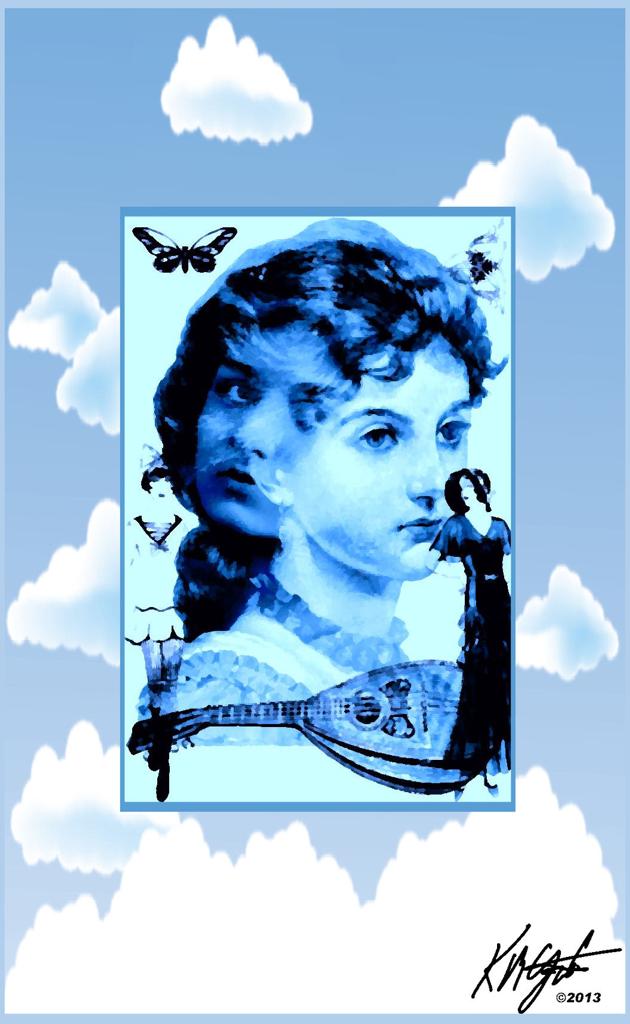
"Gypsy Woman Digital Collage and Linux Experiment" Corel - Plus

Gypsy Woman Digital Collage


Recently we received a Dell Latitude X300 throwaway laptop from the garbage. It's screen is broken with an "S" sized crack that blacks out part of the screen.

It had a password protected Bios and Windows 2000, also password protected. I was able to go to Linux as a way to break into the OS.

I made an Ubuntu boot disk, LinuxMint boot disk and a PuppyLinux boot disk and all failed with a PAE kernel failure. With some consultation with a friend I got SnowLinux Non-PAE E17 boot disk made and it booted and took a few hours but I finally made the laptop HDD bootable.

I also had been given a VGA flat screen monitor, that I plugged in and it worked so I could see all the screen. The only drawback is that the battery does not work and the AC adapter is from my wife's laptop, which has no battery! So I have to share that adapter!

I am still learning SnowLinux and it's capabilities. But It did take me away from creating for my blog.

Today I have time to create. I took two ladies faces, one a free Vintage Gypsy, and another a Steampunk image from Dover Publications Sampler. I merged both as the central focal point in Corel PhotoPaint. I added two dressed women, a flapper and well-dressed lady.

Also from Dover Clip Art I used a mandolin, matching the Gypsy aspect. And a butterfly and a corner Victorian sample to the upper corners.

In PhotoPaint I made it into a quadtone and then converted to an RGB image. I took KPT's Collection Pyramid Paint and painted the image with a blue tint.

Saving this image I opened it in Corel PSP Pro X3 to add the cloud and sky frame. I added my signature to the image using the Visible Watermark and a PNG file.

I saved the large iteration and resampled for display.

So after my adventures with Linux (which I am still learning) I had time to create this double faced woman's portrait for your enjoyment.


Thursday, May 2, 2013

"Of Crossed Guitars Seagull C12 and Lyon 6" Corel PSP Pro X3

Crossed Guitars Seagull C12 and Lyon 6


From my photography session the other day. I crossed the two guitars to contrast them and their differences. I used a brown couch and a patterned pillow to prop them up at the crossing point.

I opened from Picasa 3.9 update with Corel PSP Pro X3, I recently reviewed Corel's newer X5 version, very nice implementation.

In PSP Pro X3 I applied the Digital Camera Noise Removal, and the Smart Photo Fix with an increase in color. I wanted a sharp warm image so I applied the High Pass Sharpen tool and the Effects Color Balance Fluorescent Warm. I then increased the Saturation with Vibrancy to punch up the colors. I used KPT Collections Equalizer for some additional Vibrance, turning up the settings.

I added my copyright and name and saved the large iteration. Then I resized for display and saved with an new iteration name.

Today is a busy day so to even have time to do this was precious time. Glad I could do it!


Wednesday, August 15, 2012

"Woodward Dream Cruise Build-up" Paint.NET - Plus

Custom Hot Rod


The Detroit Woodward Avenue Dream Cruise 2012, is this weekend, unofficially starting on Friday. Here I have another photograph of a Custom Car from the AutoRama 2012.

I browsed to the folder with the AutoRama photographs and selected this Custom Hot Rod. I opened with Paint.NET and applied the Ink Sketch feature for the black detail, boosting the color all the way up. I took the Ink down just a tad to show more color.

I saved that iteration and opened with Corel PhotoPaint where I used the plugin KPT Collection's Lens Flare for a blue and red flare. I saved that file and opened with Corel PSP Pro X3.

In PSP I used the Hue and Saturation Vibrancy for some punch to the colors. I applied the Depth of Field to the photograph to focus on the car as much as I could, blurring the background a bit.

I added my signature with the Visible Watermark tool. Then finished the image off with a 25 pixel black border. I saved that iteration as well then resized it for display.

Thus far the weather reports look good for the Dream Cruise Saturday and Sunday this weekend. We hope to be there for capturing some new photographs of great cars.

Listening --- The Beach Boys --- Fun, Fun, Fun

Wednesday, July 18, 2012

"Grunge Cool Dude" Paint.NET - KPT Collection - Plus

Grunge Cool Dude


"Grunge Cool Dude," began as a trip to Dairy Queen for something cold, I garnered this photograph of my Grandson. I opened from Picasa 3.9 with Paint.NET. Here I cropped the photograph and applied the Ink Sketch feature to it. I copied to the clipboard. I opened Corel PhotoPaint and pasted as New from Clipboard.

I took that image and applied KPT Collection's Gradient, which gave me a blue background. I then pasted from the clipboard the photo image and used the property Multiply on it to let the gradient show through. I added my signature in white, merged all layers and added a blue border to the image using Image, Papersize, Centered 40 pixels.

I then used Filter Forge's Photo Effects Grunge on the piece for texture. I applied a light effect so as to show as much of his face and sunglasses as I could. I saved the large file, then resampled for display.


Friday, March 9, 2012

"Watermelon Pickup Truck" Corel PSP Pro X3 - Corel PhotoPaint

Watermelon Pickup Truck


"Watermelon Pickup," is a photograph manipulation  of one of the images taken at the 2012 AutoRama. I opened the photograph first with Corel PaintShop Photo Pro X3.

There I applied the Lights to the image for the corner lighting effect. I added a couple of other effects that I kept simple. I saved the large file and opened with Corel PhotoPaint.

In PhotoPaint I applied the Local Equalization for high contrasts and the Tone Curve for color depth. I used the Tune Blur Soften on the image. Then applied KPT's Collection Lens Flare to augment the lighting I did in PSP.

I ended with a High contrast textured image with highlights of this Chevrolet Pickup. I saved another iteration of the large file. Re-opened with PSP and added the white ragged edging and a black frame. Saving that I resized for display at 180dpi.

Back in PhotoPaint I made the jagged edge black using the wand tool and the fill tool.

Listening --- Ken Brodie --- Borderline

Tuesday, February 28, 2012

"2012 AutoRama One" High Contrast Photographs - Corel PhotoPaint - Corel PSP Pro X3

Green Custom

Red Blue Custom

Red One Custom

Yellow Custom


My son, Keir M. Gatzka, borrowed my Canon Rebel XTi and went, with my Brother to the 2012 AutoRama in Detroit. It was held at Cobo Hall. He got about 180+ photographs, I selected just four today to do some photo manipulation on them.

I browsed in Picasa 3.9 and opened each with Corel PhotoPaint. I used the Local Equalization on them and then the Tone Curve for depth. I added some lens flares from KPT's Collection, I added my signature there and saved the large files.

These I opened with Corel PSP Pro X3 and added some Image Information, and a black border of 25 pixels each. I resized in PSP for display and uploaded them to gatzkART!. I had cropped only one photograph and lost the EXIF data on it, but the others are intact.


Listening --- Dishwalla --- Counting Blue Cars

Friday, November 18, 2011

"The Calculus Lesson" Digital Collage - Corel PhotoPaint - Picasa 3

The Calculus Lesson

Today I continue with Digital Collaging for this image, "The Calculus Lesson."

Opening PhotoPaint, I scanned in a print of a painting for the colorful background. I then used KPT Collection's Equalizer feature on it for a Gaussian like blur. I then applied PhotoPaint's Effects, Distort, Wet Paint to the background for the dripping paint illusion.

Browsing with Picasa 3 in my Dover Publications Sampler folder I found the Owls with what looked like a master and his students. I applied the property Subtract to add transparency, keeping some of the color.

I added a few flying creatures, the bird, dragonfly, butterfly, and fly for an outdoorsy appearance. Using the property Multiply for transparency on each and resizing them for this collage.

I then added the final touch, the Calculus equation page, using Multiply, for the Lesson theme.  This also came from Dover Publications.

I saved the large file after adding my signature, and resampled for display.

Listening --- Kirk Mathew Gatzka --- The Empire of Fame

Wednesday, October 12, 2011

"Slip Sliding Away" Paint.NET - Corel Painter 11 - Corel PSP Pro X3

Slip Sliding Away

We took a little trip to Spicer's Cider Mill for cider and donuts the other day. I got some photographs of my Son in Law and my Grandson Playing together. This is one of my favorites, sliding down the slide.

I opened the photograph in Paint.NET and applied the Ink Sketch tool with the color turned all the way up. I adjusted the Curves to deepen the tone. I saved that large file and opened with PhotoPaint, adding a lens flare with KPT's Collection and added a beveled frame. Saving that I opened it with Corel Painter 11 and selected a felt tip brush and chose the quick clone. I then applied the Auto Van Gogh using that brush setting.

I selected the soft cloner to add back in some details to their faces and arms, hand, and legs. Saving the file with a iterative save I opened with PSP Pro X3 and used the Vibrancy tool on it for a boost to the colors. I added a crumpled paper texture to it as well. I saved the large file then resized in PSP to display size here with an increase to the dpi around 150 but a decrease to 1220 pixels length.

It was a great little trip and the cider and donuts and watching my Grandson play made it a worth while endeavor away from the computer. And I gained some new photographs to boot.

Listening --- Paul Simon --- Slip Sliding Away

Saturday, May 21, 2011

Coffee Cups - Grunge - High Contrast - PhotoPaint - Filter Forge


A diversion from Guitars and Portraits today. This photograph was taken by my son Keir M. Gatzka with the Canon Rebel XTi. In it you can see coffee cups in a row along a deep red ledge in our kitchen.

I opened with PhotoPaint and created another High Contrast Grunge image, using my favorite workflow techniques that I do for these types of images.

I used Filter Forge's Photo Effects Vibrant and KPT's Collection Lens Flare for a boost and some flare. It's a departure from my favorite motifs but is still in the vein of high contrast and grunge images. It has depth and color and was enjoyable to create.

----------------
Now playing: Kirk Mathew Gatzka - Talk It Over
via FoxyTunes

Monday, September 13, 2010

Alaskan Roadside Waterfall - PhotoPaint - Paint.NET


Browsing with Picasa 3 I was looking through some photographs of our trip to Alaska to visit family and ran across this photograph.

Roadside waterfalls are common and very picturesque. I opened this in PhotoPaint and resampled for the web. Then I opened in Paint.NET used a painterly filter on it, adjusted the Curves and upped the saturation.

I reopened in PhotoPaint and used KPT's Collection Equalizer on it to get this look. I added a watercolor frame with Filter Forge's frames, and a 10 pixel black border.

Musically I was working on "What Are You Afraid Of?" late yesterday and I am pretty satisfied with the melody and chord progression, bridge and the overall sound of the song. I added some improvised lead to the background and using Audacity I recorded it and saved the song as an mp3.

I am going to add it to My Page on the Acoustic Guitar Community for others to listen to and hopefully enjoy.

----------------
Now playing: Kirk Mathew Gatzka - What Are You Afraid Of?
via FoxyTunes

Saturday, August 21, 2010

On the Avenue - Woodward Dream Cruise


I guess that our plans for more Dream Cruise photographs for this year's annual gathering of custom and pristine old cars are amiss. It appears that not any of us will be making it to Woodward.

So I offer another couple of photographs taken by my brother Kent M. Gatzka from 2009's Dream Cruise. I again used PhotoPaint and Paint.NET as well as KPT's Collection Lens Flares coupled with the Ink Sketch filter for these. I added Filter Forge's film frames to both also.

I cropped in on these great cars to show them at their best and took out distractions, and adjusted the size for display here on the blog. Don't forget to click on them for the larger versions of them as they are at a decent size for display.

We are all disappointed that we will miss this years Dream Cruise. I was hoping for more great photographs to use for your viewing pleasure. I still have a few from 2009's that I haven't used but going is part of the fun!

Listening --- Til It All Comes (Runs) Together DADGAD --- Kirk Mathew Gatzka


Friday, August 20, 2010

Woodward Avenue Dream Cruise - Metro Detroit, Michigan


The Annual Woodward Avenue Dream Cruise is on! Every third weekend in August the Dream Cruise is held in Metro Detroit, Michigan. And this year is no exception. The Local News on Channel WXYZ is covering it [click here] as are other Television channels in the area.

The two images I have posted today were done today from Photographs by my brother Kent M. Gatzka at last years (2009) Dream Cruise.

I cropped them in PhotoPaint and saved them opening them in Paint.NET for the Ink Sketch style. Then I reopened them in PhotoPaint and used KPT's Collection Lens Flare to add some sparkle! This year my son and his wife are attending and will get more photographs for me to add to my collection of custom car photographs and share with my brother Kent who can not attend this year.

I am looking forward too using the best of those photographs to manipulate and enhance for your viewing pleasure. It's one of my favorite Digital Visual Art projects, and I like to share them here.

Listening --- Laughing At Me DADGAD --- Kirk Mathew Gatzka

Sunday, January 24, 2010

Two Guitars One Flare


Continuing with the guitar motif I created today's image. I used Paint.NET to open, resize and combine layers using a guitar photo and a grunge background. I used the Pencil Sketch filter on the guitar layer before merging the layers, applying the Color Burn layer property.

I saved that file and opened it in PhotoPaint to use KPT's Collection Lens Flare to add the video flare to the image. the expression I am after is the feeling of the attachment that a musician, in this case the guitar player, can have with his instrument. At times the two meld into one as the music flows freely,

The flare represents that connection between artist and instrument. The background expressed the depth of feeling generated. The music comes from inside as the two work together in creation.

If you look closely you can see another guitar in the upper left background. It is like an echo of the first though it has 12 strings instead of six. This represents harmony for the artist and his instrument. Working together the music is accomplished.

----------------
Now playing: Kirk Mathew Gatzka - Norwegian Wood Cover
via FoxyTunes

Saturday, January 16, 2010

Red Chevy Wagon circa 1956


Before SUV's and Mini Vans there were the Station Wagons for families. Roomy and stylish this custom wagon is a beauty.

The original photograph was taken by my brother Kent M Gatzka at the Frankenmuth, Michigan Auto Festival of 2009. I applied similar techniques in PhotoPaint and Paint.NET as I did in the previous post. Highlighting the sun flares with KPT's Collection Lens Flare filter.

Recently I have been working on a laptop with Windows 7 OS and learning how to Network and transfer music files from my main PC to it. Windows 7 seems to be an improvement over Vista from what I gather reading about it and using it. I still have Windows XP on my main PC.

The only thing I could not get it to do was share the Epson printer over the Network. I still haven't figured that one out. So I swap to a USB port from one to the other and get the ability to Print with either unit. I believe that Windows 7 has the most up to date driver for the printer and somehow that confuses XP.

It has a lot to do with making folders sharable if you want to transfer files. I also have brought over all of my images from previous posts of gatzkART to the laptop, and included my Alaska vacation photographs as well.

Working with Windows 7 is still a challenge. But I have been able to use Wifi at different locations and downloaded: Open Office; Paint.NET; Picasa 3; and a few updates too. I would like to have my Corel products on the laptop but they need a Windows 7 compatible license number which I don't have for the older products. Right now it is cost prohibitive to upgrade to the newer programs that I'd like to add.

It will also connect to the Internet through my dial up connection but is very slow connection speed. Usually I get 45.2 kbps and that's it. I like the Wifi of course! I just have to buy more coffee and visit the places where connections are free!

----------------
Now playing on Windows Media Player: Alison Krauss - Rich Woman
null

Tuesday, December 29, 2009

Milestone 300th Post - 1955-56 Chevy


Three hundredth blog post! It is my pleasure to have been able to have this blog. And I hope you have enjoyed it thus far. I have done my best to provide an interesting and informative narrative, with high quality images.

I plan on continuing to bring you more informative content and images.

Today's image is a 1955-56 Chevy Convertible. I used similar graphic techniques as other recent images. The photograph was taken at the Frankenmuth, Michigan Auto Festival 2009 by Kent M. Gatzka.

I used Paint.NET for the Ink Sketch look and KPT's Collection Lens Flare for the highlighting the gleam of the sunlight. In PhotoPaint I re-sampled the image and added a small black frame. I also used the Tone Curve to give more depth to the colors.

----------------
Now playing on Windows Media Player: Kirk Mathew Gatzka - Polly Come Home Cover
null

Thursday, November 5, 2009

Dual Guitars with a Little Flare


Listening to the Country Rock of Kenny Chesney right now. Great songs and backbeat on this Live version of his hits.

It was suggested I do a series based upon the photography session I had the other day. How they knew I was thinking of the same thing I don't know. But today's image is another of the photographs of the Lyon and Seagull guitars.

I opened this photograph in PhotoPaint and used the Tone Curve on it to darken it a bit. Adding to the saturation made the colors of the two instruments deeper. I also added a Black shadowed frame and a Walnut colored thin frame to it.

I used KPT's Collection Lensflare to add the colored flare to the image with the largest portion on my pickguard. If you look closely you will see I etched a design on the pickguard to customize the 12-string Seagull, made it my own, so to speak.

I am enjoying this series of images and hope you like them as well. As a guitar player images done in an artful way are appealing to me. I have more to come and will share as I go.

----------------
Now playing on Windows Media Player: Kenny Chesney - What I Need to Do
null