Pages

Showing posts with label Dover Clip Art. Show all posts

Friday, June 26, 2015

"Butterflies with Woman Textured" Corel Digital Collage

Butterflies with Woman Textured


"Butterflies with Woman Textured," started with a background texture from Stockvault's Freebies, a Photograph of a Young Lady with a black background, and a piece of Dover Publications Sampler Clip Art.

I opened Corel PhotoPaint and loaded the Texture first. I added a layer of the Young Lady, which I trimmed off the corners from the photograph. I also applied the Threshold tool to add some white space for transparency (using the property Multiply.) I moved the Young Lady to the lower right hand corner and merged that layer.

I searched for a piece of clip art I could apply to the collage. I found one of Butterflies and Flowers. I opened that, copied it and pasted it from New from Clipboard. I scaled to fit the Texture. I merged that along with my signature and saved the large iteration.

I used Filter Forge's Photo Effects Vibrancy to boost the colors. I saved again. I reopened it in Corel PSP Pro X3, there I boosted the Saturation Vibrancy for more punch to the color. I resampled for display.

Musically speaking, my Lead Guitarist is on vacation, so I haven't heard back from him as of yet. I am hoping that he can improvise a good lead line for "I Still Remain," my newest song. In the meantime I am looking at a Blues Dialect lyric I wrote recently, and endeavoring to put it to music with chords and melody. Stayed tuned for more information on the release of the new song.


Monday, January 12, 2015

"Tired Man Collage" Paint.NET - Corel

Tired Man Collage


This particular image is of a "Tired Man," with Collage items added for interest. The face is from MorgueFile and the paper texture is from StockVault. The others, the woman, ferns, steampunk balloon, are all from Dover Publications Sampler Clipart. 

I did the majority of the layering and placing of the individual pieces of this little Digital Collage in Paint.NET. I started with the man's portrait, I flipped it horizontally first. Then applied the Outline tool for the reverse color. (It was Black and White to begin with.) I added the colored Paper Texture as a second layer. This placed the Portrait in the upper left hand corner, as the texture was a larger file.

Rather than adjust this I decided to search for some Clipart pieces, to make a Digital collage, on my External Hard Drive. After some time I picked the pieces here at random, hoping the viewer would make up a storyline for the resulting image.

I used Multiply as the transparency property on the layers, including my signature. I did some Curves adjusting still in Paint.NET then saved the large iteration.

I reopened that in Corel PSP Pro X3. Here I boosted the colors with Saturation Vibrancy set at 33, and I again touched it up with Curves for depth. I saved again and opened in PhotoPaint, after adding some Image Information.

In PhotoPaint I resampled the piece for display. Saving the Medium sized image compressed by 75 and smoothing at 33, for display here.

After viewing the image of today, click HOME and scroll down - Please don't forget to View my new video slideshow, a retrospective of some of my 2014 artwork along with a soundtrack of an Original song I wrote and recorded, "Reality Show." It is only vocals and my Seagull 12-String guitar, I wrote the lyrics and used an upbeat chord progression for the song. Simple is sometimes better, I did not add any lead or piano to it. 

Click on it and go to YouTube and like it for me, and comment on the Artwork and the song there if you wish! Thank you.


Monday, October 27, 2014

"Stone Textured Woman with Dogs - Horse" Digital Collage - Corel

Stone Textured Woman with Dogs - Horse
As I mentioned I would endeavor to create some new Digital Collage works. I had time to do so with today's offering for your viewing.

I started with a Stone Texture from StockVault, I opened it with Corel PSP Pro X3. There I used the Curves tool to lighten the Stone background. I then opened the Woman with the Dogs and Horse. I used the Curves tool again, this time to deepen the colors of this Dover Publications Clip Art. I also increased the Saturation Vibrancy by 33.

Using Corel PhotoPaint, I opened a page of Dover Clip Art with Art Nouveau Designs in black and white. I selected the Bottom Design and cut that out, saving as it's own file. Then I opened the Vines for the Top Design to add some framing to the Woman image.

I copied and pasted these as new layers in PSP, as well as a layer of my signature. I adjusted the size of each one, placed them in position and then Merged all the layers to one.

I saved the large iteration and resized for display in PSP. Saving that I opened it one more time in PhotoPaint. There I applied Filter Forge's Photo Effects Vibrancy one more time for a boost to the overall colors. I also compressed the file by 70, as it is a 300 dpi image, smoothing is set to 15 I saved the file once again with these settings.

I have many more pieces of Dover Clip Art Samplers on my external drive, to use for additional Digital Collage Artworks. Also StockVault and Mayang's Textures supply me with many types of backgrounds. Look for more of my Collage work in the near future.

Sunday, October 19, 2014

"A Straw Hat Young Woman Map NYC" Corel

A Straw Hat Young Woman Map NYC


I got this photograph of the Young Woman in a Straw Hat from StockVault. I am uncertain where I got the Vintage NYC Map from, it may have been Dover Publications.

I opened the Young Woman using the Organizer in Corel PSP Pro X3. The EXIF data says it is an iPhone photograph, It was somewhat washed out, but otherwise had nice detail. I ran it through the Threshold tool and made it black and white, I adjusted the image to show enough of the nose and straw hat as possible. It resulted in some full black space, which I liked. I used the NYC Map, from my Dover Samplers Folder, as a layer and had to do a few things to it. I had to enlarge it, to fit, using Curves I gave some more depth to the colors. After I merged those layers to one I added my white signature.

I also used the Saturation Vibrancy to boost the colors of the Map. I merged the Map using the property Darken instead of Lighten, which placed it in the white space of the image. I added a 25 pixel border in black to make the top of the image fit better. I used Image Information to add Title, Copyright, Programs used, etc. Saving the Large iteration I resized for display to 1200 x 1200 pixels.

As always, please click on the image for the larger view. Comments are always welcome! Don't forget to view other Artworks of mine by using the Labels (tag) Cloud at the bottom of the screen, or the Google Search for my Artworks of various styles and kinds. You are always invited to search through my blog for Digital Collage work and Guitars, and various other images found here.

I had time to update my Acoustic Guitar Community Page to match my blog for consistency. If you enjoy Singer/Songwriter Folk/Rock and music in general Visit my page at AGC! Have a listen. You can scroll down the pages there to see the explanation of each song in my Player. Scroll to the song you would like by using the Next or Previous buttons on the Player. to stop a song or pause it hit the Stop button. Very simple player options. Enjoy!

Friday, August 22, 2014

"Vintage Woman and Horse on Paper Digital Collage" Corel - Dover

Vintage Woman and Horse on Paper Digital Collage


Had some time today to work on this Digital Collage. I used some images from StockVault's Free Textures (the vintage paper background,) and some Dover Publication Samples (Woman and Horse, Florals, and Art Deco Flourish.)

I opened the Woman and Horse in Corel PhotoPaint, here I applied the Tone Curve to deepen the colors. I separately opened the Vintage Paper (I cropped this image,) and here pasted the Woman and Horse, using the property Subtract.

I searched through my collection of Dover sample clip art for the Florals and added them, resizing and darkening with the Tone Curve before merging them. I used Color Burn and Multiply to add them with transparency. I added my signature using Color Burn for a burnt tone. I resized in Corel PSP Pro X3 and added Image Information: Title, Copyright, Sources and Programs used. I added a Mustard border to the image and saved the iteration you see here.

I have been extremely busy this month with an unrelated Project which will conclude at month's end. I am looking forward to creating more Art and playing and recording music with my 12-String Seagull Guitar in the near future. Not counting watching my Grandson!

Wednesday, April 16, 2014

"Grunge Steampunk Woman Portrait" Corel

Grunge Steampunk Woman Portrait
Vintage Paper


I decided to create a similar image as the recent posts I have done. I chose another Digital Visual Collage with StockVault Woman Portrait and Dover Publications SteamPunk coloring page, along with a Vintage Paper Texture background.

I opened the Young Woman photograph in Corel PhotoPaint and applied the Threshold tool for the white space. I cropped the portrait to fit the Vintage Paper Texture, selecting only a close up of her face.

I then chose the Dover Publication coloring page of a SteamPunk Octopus-like creature with a great border. I applied the property of Multiply to this and fit to the image.

I next used Filter Forge's Photo Effects Grunge on the merged image and that added a great patina to the image. It also deepened the colors creating additional mood.

I added my signature in white and saved the image at 300 DPI. Re-sampling to fit my post I concluded my workflow.


Tuesday, February 18, 2014

"Art Deco Panel with Women and Vase" Corel

Art Deco Panel with Women and Vase


I scanned in an Art Deco Panel from Art Deco Interiors And Panel Designs collection by Stephen Calloway. I used 300dpi and 8.5" x 11" size for the original Panel scan with my Canon MP495. I had also used some recent Samplers Clip Art from Dover Publications for this Digital Collage, thus the Women and Vase. I did get the upper most women and vase from the Free Vintage Digital Stamps site.

I assembled the Collage in Corel PhotoPaint. I used the Tone Curve on each piece and also the large iteration before saving. I used Filter Forge's Photo Effect to increase the color Saturation Vibrancy then added a Filter Forge Frame Film Frame to darken the edges of the piece.

I had to use Filter Forge's effects on the display size as I only have the Free versions of Photo Effects and Frames from them, the original iteration was just too large.

I truly enjoy Digital Visual Collage work and like working with Dover Publications and the Free Vintage Digital Stamps pieces when creating these pieces. I like to use the Vibrancy tool for the punch it gives to the colors, especially scanned in colors. These Art Deco Panels and designs, along with the Art Nouveau designs I use are among my favorite periods of Design.


Tuesday, January 14, 2014

"Steampunk Art Deco Collage" Dover - Corel

Steampunk Art Deco 1

Something different for my post today. I decided to scan in an Art Deco plate from Art Deco Designs / Edouard Benedictus. I used my Canon MP495 to scan in the Art Deco plate. I selected from my Dover Publications Samplers two persons in Steampunk Underwear. I opened the scan in Corel PhotoPaint.

There I assembled the Collage. I copied and pasted the gal and guy and erased the background before merging them. I added Birds to the upper right corner also from Dover. I also searched for other unexpected pieces and found an old Building and Trees Landscape Pencil sketch in my Picasa 3.9 folders.

I copied and pasted that from Picasa and resized it to fit the entire image. I applied the property Multiply and altered the Opacity and added it to the collage. I added my signature to the piece and saved the large iteration. I resampled to a size for display here.

Art Deco - Steampunk - Dover - and a Freehand Pencil Sketch in Sepia tone, all combined in an unusual Digital Collage.

Wednesday, September 25, 2013

"Rusted Gal Digital Collage" Paint.NET - Corel

Rusted Gal


I began today's creative work by searching my external archives once again. I opened a photograph of a Young Lady in Paint.NET. There I applied the Artistic Ink Sketch without color for a black and white image.

I then searched in my Mayang's Textures folder for some colorful Rust and Paint textures. I found the texture and applied it as a new layer in Paint.NET, saving that image.

I opened with Corel PhotoPaint. Then I began a search through my Dover Publication's Sampler folder for some other collaging ideas. I found the clip art image of the cats and cut and pasted into the image, fit to the image size of the portrait and merged all.

I also found an Art Nouveau design which I placed and flipped vertically, used the Tone Curve to darken and the property Multiply adding that. I also found a group of jewelry pieces and selected a Cameo for an earring. I added that with cutting and pasting, and resized it a bit, placed it on the earlobe and merged.

I used Filter Forge's Photo Effects Vibrance and a Film frame.

I added my signature in white by inverting the black and white PNG file. Saving the cropped image at a large size I then resampled to display size.


Monday, September 16, 2013

"117,000 Plus Pageviews! - Floral Textured Guitars" Corel

Textured Floral Guitars

After a long hiatus, a trip to Iowa to attend a wedding and many days spent with my Grandson, I am posting. We reached another Milestone of over 117,000 Pageviews! Thank you for viewing!

I began with a photograph of our two Guitars and layered a house and trees and muddied sky over that. I then sought a Mayang's Texture of Rust and layered that into the image. I used Corel PhotoPaint to create this image.

I was not satisfied with the image as it had red-orange flowers in the upper third it. So I used an Art Deco color floral image from Dover Publications to layer and adjust and add more flowers with color punch.

I did a lot of adjusting to each layer with properties and opacity changes. Again I tried to create an unusual topical image of guitars with lots of texture. I think I succeeded.

I worked with some smaller images and after I did my creative work I saved that iteration. The I opened it in Corel PSP Pro X3 and added copyright and title information. I enlarged the image to 196 dpi and saved it with another name for a possible print out image.

Those of you who follow my blog I thank you! I offer my work for sale as Posters through Zazzle or as Prints through Fine Art America. If you see a work you would like a print of not currently listed on either site, Please visit my Art for Sale page and write me to request any special order. Orders done this way may garner a discount in my pricing, depending on quality and sizes available. Thank You for your interest!


Friday, May 17, 2013

"Gypsy Woman Digital Collage and Linux Experiment" Corel - Plus

Gypsy Woman Digital Collage


Recently we received a Dell Latitude X300 throwaway laptop from the garbage. It's screen is broken with an "S" sized crack that blacks out part of the screen.

It had a password protected Bios and Windows 2000, also password protected. I was able to go to Linux as a way to break into the OS.

I made an Ubuntu boot disk, LinuxMint boot disk and a PuppyLinux boot disk and all failed with a PAE kernel failure. With some consultation with a friend I got SnowLinux Non-PAE E17 boot disk made and it booted and took a few hours but I finally made the laptop HDD bootable.

I also had been given a VGA flat screen monitor, that I plugged in and it worked so I could see all the screen. The only drawback is that the battery does not work and the AC adapter is from my wife's laptop, which has no battery! So I have to share that adapter!

I am still learning SnowLinux and it's capabilities. But It did take me away from creating for my blog.

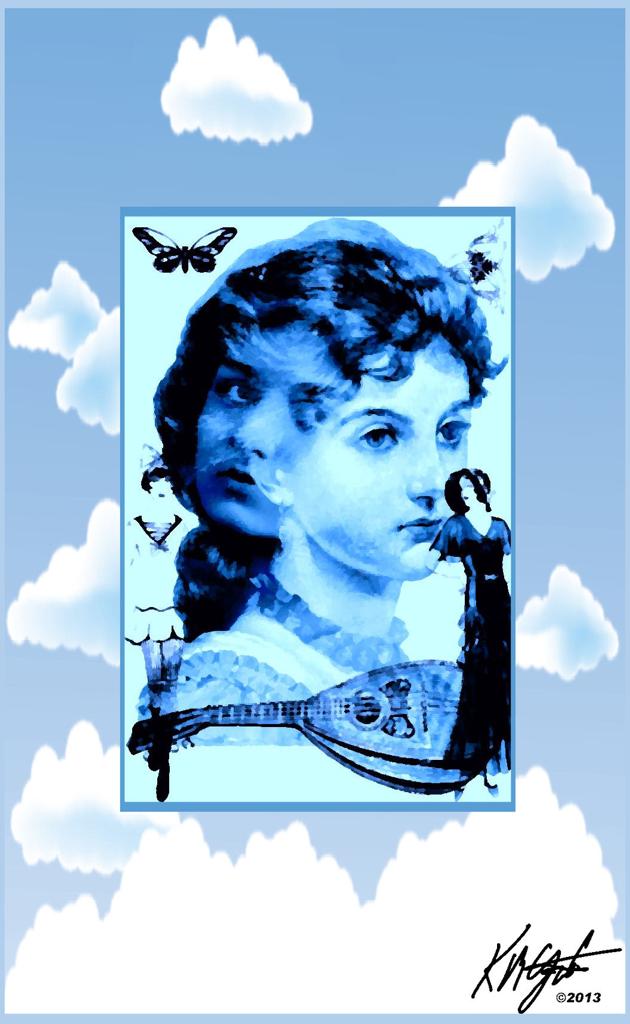
Today I have time to create. I took two ladies faces, one a free Vintage Gypsy, and another a Steampunk image from Dover Publications Sampler. I merged both as the central focal point in Corel PhotoPaint. I added two dressed women, a flapper and well-dressed lady.

Also from Dover Clip Art I used a mandolin, matching the Gypsy aspect. And a butterfly and a corner Victorian sample to the upper corners.

In PhotoPaint I made it into a quadtone and then converted to an RGB image. I took KPT's Collection Pyramid Paint and painted the image with a blue tint.

Saving this image I opened it in Corel PSP Pro X3 to add the cloud and sky frame. I added my signature to the image using the Visible Watermark and a PNG file.

I saved the large iteration and resampled for display.

So after my adventures with Linux (which I am still learning) I had time to create this double faced woman's portrait for your enjoyment.


Tuesday, May 7, 2013

"Bright Petunias and The Bridge" Corel Painter - Paint.NET - Corel PSP Pro X3

Bright Petunias

The Bridge

I began this image with a Dover Publications Sampler of Petunias in black and white. I opened in Painter 11 and selected the Camel Watercolors Brush and painted the Floral. I selected unusual colors for a punchy effect to the image. 

I then used a Gouache Cover Brush resized for the solid colors in the background. I saved that iteration and from Picasa 3.9 opened with Corel PSP Pro X3. I upped the colors with Saturation Vibrancy. I added my signature with the Visible Watermark tool. 

I then proceeded to experiment with differing frames for enhancement of the painting. I selected the black and white scroll work and then I added the ornate frame, still in PSP Pro X3

The second image is from a Challenge photograph on Painter Talk Forum. I manipulated the image in Paint.NET, using the Oil Paint effect. I saved that iteration and opened from Picasa with Corel PSP Pro X3 and added Brush Strokes and some Vibrancy to the colors. 

I simplified the colors using Posterize for an even more painterly feel. I then added a Paper Texture to the image and saved, then resized for display, added my signature and saved..

Two Painterly Images today! Click on them for more detailed views.


I had time to practice my guitar playing yesterday and worked on the finger calluses on my left hand. I did play some Blues lead with a Backing Track as well as played chord progressions and some songs. I ended up with a gravelly throat for I was really punching out the choruses! Sore fingers today but a satisfied inner self. 

Monday, March 25, 2013

"A Little Romance Never Hurt!" Digital Collage - Picasa - Corel

"A Little Romance Never Hurt!"


 gatzkART! has reached over 97,000 Pageviews and 1,070 posts today! I was using The Old Reader RSS reader to import my Google Reader content. I was reviewing the posts and found two old-fashioned love photographs from ART FREEBIES, a blog of Public Domain images and photographs.

I saved them to my folders in Picasa and created a collage with Picasa 3.9. I added the page of images of Old-Fashioned Love and Marriage from Dover Clip Art sampler folder.

Using Picasa I tinted the entire collage with blue and saved that. I used the setting for the size of my current desktop size, It saved a large iteration.

I opened it with Corel PhotoPaint and worked on adding the Nebula background to it. I saved that and added the title caption, in PhotoPaint adding my signature.

I also resampled it in Corel PSP Pro X3 to display size. I then saved that. Times have changed as you can see from these examples of Love in the old days.

"A Little Romance Never Hurt!"

Some things haven't changed a bit!

Tuesday, March 19, 2013

"Art Nouveau Digital Collage" Corel - Plus

Art Nouveau Digital Collage

Yesterday I enjoyed using my Dover Publications Sampler images for an Art Deco image. I decided as I browsed the folder in Picasa 3.9 to create an Art Nouveau Digital Collage.

I opened in Corel PhotoPaint. I selected a Floral background and a border piece and cut and pasted the border onto the Floral. I duplicated it four times after applying the Multiply property, for the left hand side. Continuing my browsing and came upon two woman's faces in circular form, still Art Nouveau style.

I cut and pasted these onto the Floral background. I used the masking tool to cut them out and using the Multiply property again on them for transparency. I resized them to balance the composition. I merged these to the background.

I opened in Corel PSP Pro X3 to resize, add a matte and a Golden Picture Frame. This image was saved and reopened in PhotoPaint. I added my signature and resampled it to display size.

I really am a fan of Art Nouveau and Art Deco styles and enjoy creating Digital Collages using Picasa and my Corel programs. I have books of plates of both that I can scan in and use as well. I keep my playful attitude toward creating Digital Artworks.


Sunday, March 17, 2013

"The Celebratory Dance" Art Deco Digital Collage - Corel Plus

The Celebratory Dance


Browsing my Dover Publications Sampler folder in Picasa 3.9 I found a decorative floral with line. I also searched for a background for this and came up with an Art Deco Floral background.

In Picasa I lightened the Color Art Deco Floral a bit and brought them all into Corel PhotoPaint. I used the Wand tool to select the white and filled it with a sky image. I applied the decorative floral with lines, deepening the line coloration with the Tone Curve and using the Color Burn for transparency.

I searched a bit further and found an image of women in various stances. I selected the Dancer with Flowing Hair to add. I cut, erased and placed the Dancer onto the two backgrounds.

I added another image from the Dover Clip Art of a Couple Celebrating with Champagne, as if they were drinking to the Dancer. I increased their depth with the Tone Curve as well. This made for a Celebratory feel to the image.

I added my signature inverted to white and merged all together to one layer. I saved this iteration. I opened with Corel PSP Pro X3 and used the High-pass Sharpen tool on the image. And softened the background using the Digital Camera Noise Removal tool.

I liked the Ornate Frame so I applied that from Image, Picture Frame. It gives it a Museum quality I really like.

So goes the making of the "The Celebratory Dance."

Wednesday, March 6, 2013

"Woman Playing Violin" Corel - Plus

Woman Playing Violin


I received some new Dover Publications Clip Art today. This image of a woman violin player struck me with it's flowing lines. I selected a Mayang's Texture in Picasa and I opened it in Corel Painter Photo Essentials 4 and auto painted it with the Simple Watercolor setting, Rough Paper, and stopped it before it finished. Saving the background I opened Corel PhotoPaint.

I copied and pasted New from Clipboard the simple watercolor. Using the rectangle selection tool I moved the background to a position where I liked the colors and brushstrokes. I cropped that and opened as a new file. I rotated it ninety degrees to a portrait setting.

I when to my Dover Clip Art folder in Picasa and opened the image of the Woman Playing Violin and copied and pasted it onto the painted background. I resized it to fit and used the property Color Burn on it for transparency.

Back to Picasa I selected another piece of Clip Art of music. I cropped to just a portion of the beginning score. Copied it and pasted onto the background, used the Color Burn and resized to fit in PhotoPaint.

I then looked for a Flourish symbol in Dover Clip Art. I copied and pasted that onto the picture. I rotated it to flow horizontally and also placed with Color Burn.

I then merged all and saved the file. I added my signature inverted to white, to the image. Saved that with a new name.

Friday, February 15, 2013

"Digital Painting - Lighthouse" Corel - Plus

Digital Painting - Lighthouse


I have selected a recent Dover Sampler Stain Glass image of a Lighthouse for the subject for today. I opened Picasa 3.9 browsed to my Dover Clip Art folder and picked this image. I opened with Corel Painter Photo Essentials 4 and auto painted with the Gouache settings. Saving this I opened with Corel PSP Pro X3.

There I added Saturation Vibrancy and used the Smart Photo Fix on it for some color and sharpness adjustments. I added some sunlight to it with the Sunburst tool. I used the Artistic Brush tool to add brushstrokes to the image. This gave me the Textures I wanted. I resized the image in PSP Pro X3 and added the gold Picture Frame. I saved this iteration.

I reopened with Corel PhotoPaint to add my signature, Inverting it to white and using the Property Add to place it. I resized the signature to a bit smaller and moved it to it's place. I saved my final iteration for display.


Sunday, February 10, 2013

"The Strangeness of Quantum Physics" CorelDRAW

Click on Me! And Read!


Pieces of Dover Clip Art from my folder in Picasa 3.9 put together in CorelDRAW. h = What? A good question, "Like a wave or Like a particle," Its all Physics to me!

I grouped all the pieces including my comments and the large question mark together and copied to the clipboard and pasted into Corel PhotoPaint as New from Clipboard. I resized it there for display. Quantum Sweetness, to read about. "Its all so Strange!" Link to Wikipedia "Physics Strangeness"

A fun post.

Wednesday, February 6, 2013

"Seagulls Guitars and Birds" Sepia Tone Corel - Plus

Seagulls


I began this image with the idea of showing images of real Seagulls along with a Pencil version of my Seagull S12 Cedar 12-String Guitar. I browsed my Dover Clip Art folder in Picasa 3.9 and found my image of seagulls. I opened it in Corel PSP Pro X3 and resized it to a larger display size. I saved it and opened a photograph of my 12-String Guitar. I used the Pencil tool to create a pencil sketch of it. Saving that separately I reopened the seagulls in Corel PhotoPaint.

Once in PhotoPaint I opened the Pencil sketch of the Guitar and erased the surrounding area leaving the background white. I copied it and pasted onto the background. I resized it to fit the seagull background. Then I reproduced it, flipping it vertically, twice for a total of three guitars. I used the property Multiply for transparency so the seagulls would show through.

Using Filter Forge's Photo Effects I selected a Old photograph setting for the texture and framing. I applied a simple brownish Tritone to this for some tinting, using PhotoPaint.

I added my signature with copy and paste as new object, resized it for the corner and merged it with the image. To complete the image I used Filter Forge's Photo Effects Sepia Tone

Saturday, January 26, 2013

"Vintage Young Girl Playing Violin" Corel PhotoPaint - Dover Clip Art

Vintage Young Girl Playing Violin

I am keeping with a music motif with some Dover Clip Art from my Dover Publications Sampler folder in Picasa 3.9. I selected the "Vintage Young Girl Playing the Violin," and a background of Butterflies in black and green, and some sheet music. I opened them in Corel PhotoPaint and did my cutting, erasing, placing of the Girl on a bed of leaves (also Dover Clip Art) with a Bird accompanying her playing.

I used the Tone Curve to give the Girl and Bird and leaves some depth. I copied and pasted them onto the Butterflies background. On the background I did use Color Replace White to Green for the pleasant coloring. I added the sheet music from the Free Vintage Digital Art folks. which I promptly placed behind the Girl and Bird. I used the property Multiply on the music score.

I did all the work for this Digital Collage in PhotoPaint. I resampled to display size, adding my signature in white (again Inverting the black signature.) I saved the medium size iteration for display.

Musically I have been researching Chordings for Double Drop D Tuning and have found a couple of references with PDF files. Which I downloaded but then lost my page I was on so I can't share the Links.

I may use this tuning for a new song I am working on. The meter of the lyric is very different to what I usually use. So I am going to have to be really creative with the chords and melody and the chorus and verses and bridge. I am excited about it!

Feels great to be thinking and feeling musical again.