Pages

Thursday, November 4, 2010

1920's - Egyptian - Digital Collage - PhotoPaint


I received some Egyptian clip art from my Dover Public-
ations
Sampler email yesterday. I thought they were very interesting and decided to make a digital collage in PhotoPaint.

I opened as the background an image of an Egyptian official on a chariot complete with hieroglyphics. I added an Egyptian woman using object feather and the eraser on the object. I also found a recent 1920's Flapper that I copied in Picasa 3 and pasted it with the object property Multiply. I was thinking about how popular Egyptian motifs were back in the day.

I used Filter Forge's Frames again for framing the piece.

A recent discussion on a forum devoted to digital art the question was raised about using one's signature instead of a digital font to sign ones work. So I made a signature file along with a copyright symbol and year. I used that for this piece. As you can see my signature is not readable. I used that reason in my reply to the discussion as to why I used a digital font. So I tried my signature today. It looks pretty good to me, but I know it to be my signature.

So I may continue to use this form of signing my work in the future.

----------------
Now playing: Kirk Mathew Gatzka - Use It Or Lose It 2
via FoxyTunes

Wednesday, November 3, 2010

Grunge Acoustic Guitars - Paint.NET - PhotoPaint


With a song in my mind I turned to a Guitar collage for today's image. It began with a photograph taken by myself, of two guitars almost straight on. 12-string in front and 6-string in back I positioned them with the fret-boards lined up and supported them on a rocking chair.

Opening the photograph in Paint.NET, I applied the Pencil Sketch to them and adjusted the curves for depth. Saving that I opened one of Mayang's Texture files with rusty rivets for the background in PhotoPaint. In Picasa 3 I located my adjusted photograph of the guitars and copied and pasted them into PhotoPaint.

Once there I made the image fit inside the texture and using the eraser on the guitars object I erased the rocking chair. I pasted them on the left hand side of the riveted center. Using Picasa 3 I located another 12-string guitar image and opened and resized that to paste opposite the dual guitars. I used the object property Multiply on all the guitars so the texture would show through.

Still in PhotoPaint I added some paint splatters using the Distort> Wet Paint> filter on them to get the dripping effect. I adjusted the opacity a bit to allow the background to bleed through.

I then added a chord progression for the key of D and applied the dripping paint effect to them as well. I added a wide black border to the image, then used Filter Forge's Freepack 3 Frames to add a grunge frame and a simple frame. Using the wand I selected the strip of color light brown and masked it applying Texture> Plastic> to it for a 3D effect.

I resampled the image for display on the web.

----------------
Now playing: Kirk Mathew Gatzka - Sweet Laurie
via FoxyTunes

Tuesday, November 2, 2010

John Lennon - PBS - Nov 22, 2010

Watch the full episode. See more American Masters.

Self-Portrait - Painter 8 - Paint.NET - PhotoPaint


I rarely do self-portraits but I like the smile in the eyes and mouth from this photograph taken by my wife. I opened it in PhotoPaint and cropped it to only myself, then I resampled it to 96dpi to increase the size of the working image.

From here I opened the saved file in Painter 8 and used the Wow! Book Oil brushes on Auto Clone for the muck up. I painted back in details using the Soft Clone brush. I added the impasto effect to the background. I saved this and opened in Paint.NET.

There I created a duplicate layer and applied Pencil Sketch to that layer and changed it's property to Multiply. Using Adjustments Curves I darkened and increased depth of the pencil sketch. I merged the layers and saved the file again.

Back in PhotoPaint I applied the Tone Curves yet again for additional depth and upped the color saturation by 15, boosting the colors. With Filter Forge's Frames I added the frame to finish the piece. I used the wand to select the frame and applied the Effects> Texture> Plastic> for a 3d look.

Monday, November 1, 2010

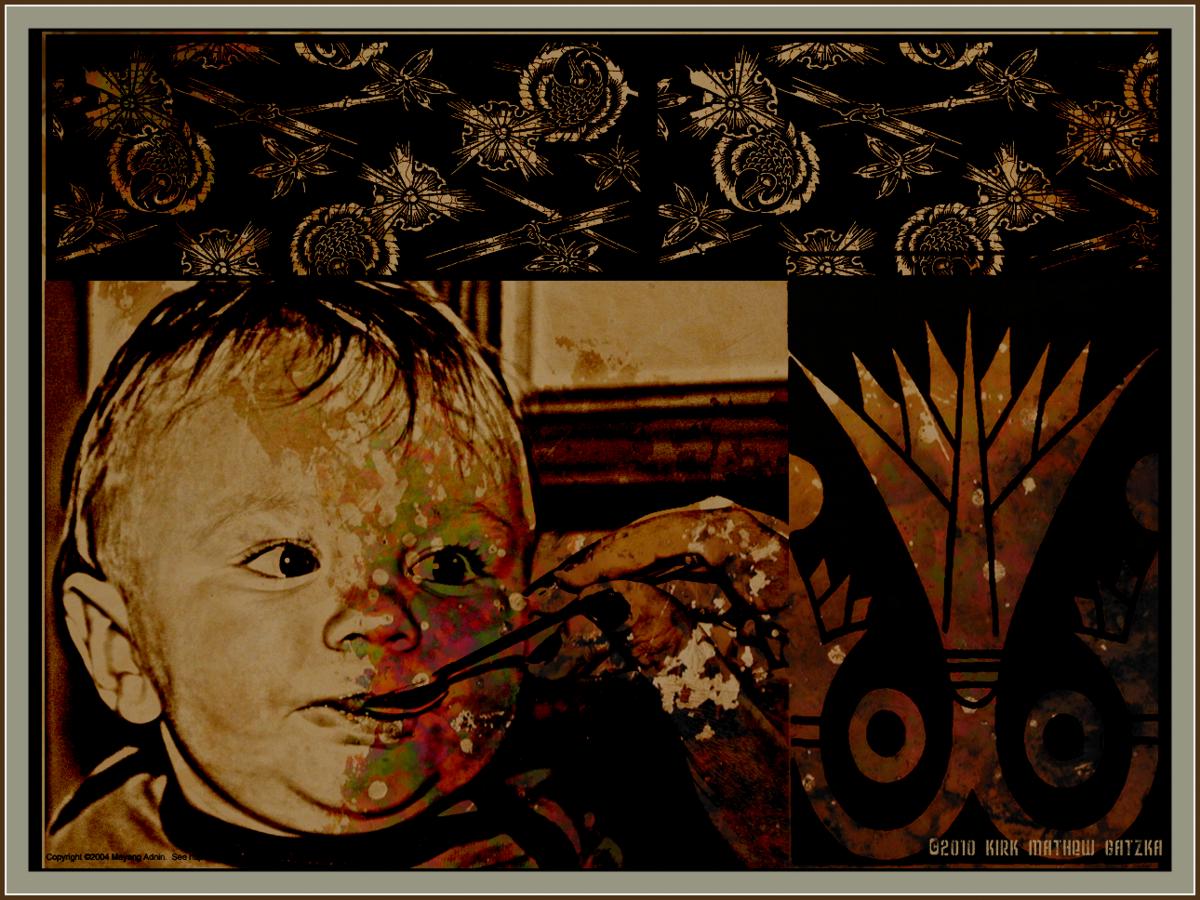
500th Post for gatzkART! - Grandson - Color Burn - Texture


This is our 500th post since starting this blog in 2008. We began late in 2008 but became more prolific as we went along. As an image today I again chose my Grandson for the piece.

I took this photograph recently as he is now eating solid food and is a good eater. I think he is a cutey but I am biased.

I used one of Mayang's Texture for the rust colored background and cropped the photograph to focus on Zeke with the spoon in his mouth. I opened the photograph in Paint.NET and used the Pencil Sketch on it. Then I used the Curves function to darken it and give it more depth.

I had the texture opened in PhotoPaint so I copied the photograph to the clipboard and pasted it as an object in PhotoPaint. I resized it to fit within the design work I was doing with Dover Publications Clip Art. On each piece of clip art and the pencil sketch of my Grandson I used the object property Color Burn for that burned look that goes well with the rust. I used Shift-Ctrl-Down Arrow to merge all the objects with the background.

I added a 90 pixel black border to the piece and then used Filter Forge's Frames to add a photo-frame.

----------------
Now playing: Kirk Mathew Gatzka - Bo Diddley Fun
via FoxyTunes