Pages

Saturday, January 24, 2009

CorelDRAW Vector Art Samples

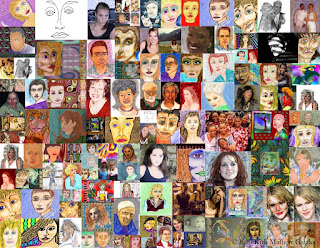
I enjoy CorelDRAW's ability to do vector graphics well. On display here is a collage of a few vector drawings I have done using various photographs as a basis for each of the imagea.

I use the freehand drawing tool and map out the basic shapes of the faces and then use fills to color them. The approach is simple enough if you can select the shapes from the shadows and outline them, then chose the right type of fills for each shape.

To show them on the blog I have them saved as jpg files or tif files and reduced them in PhotoPaint for sharing online.

I used Picasa's collage tool again to create this multifaceted image, saved as a jpg file, of course.

Thursday, January 22, 2009

Nonrepresentational Abstracts Digital Collage - Picasa 3

As I mentioned in my previous post I have made another digital collage using Picasa 3.

This image shows 188 images piled upon one another, images of nonrepresentational abstractions. It should give you an idea of what type of abstracts I do digitally.

They include use of fractals, painting, cutting and pasting, use of filters and plugins to produce the individual pieces.

You can see a love of color and diversity in my work among these. Though each one is individually crafted and thoughtfully made, this collage makes for a great piece on it's own. I view this collage as emotionally charged with images and colors rampant.

I again recommend Picasa 3 for tracking and making collages of your own digital works. I have yet to make a video, which is also a feature of Picasa 3. I have selected some music for playing in the background I just need to select the images I wish to make into a slideshow. More fun on the way!

Wednesday, January 21, 2009

Picasa Collage Tool - "Faces"

I have been doing Digital Visual Arts for many years now. I have amassed a collection of my own works that is widely diverse.

I recently have begun using Google's Picasa 3 for keeping track of my digital images, it is a free program and works very well.

One of the features I have been learning is the Collage Maker tool. You select images in any folder (I used select all for my demonstration) then you have Picasa build your collage.

It has a few different models for the collage. Here I chose a mosaic of over 100 images of faces in one folder I have. I have uploaded a 1024x791 pixel image of all these faces. I made the collage larger enough for printing borderless on an 8.5 x 11 Premium Glossy paper.

This image I imported into PhotoPaint to print and then resized for display on the blog. I am really impressed with Picasa's collage tool.

I also made another collage of 188 digital nonrepresentational abstracts as a pile of images thrown on the "canvas". I will also share it in another post.

I recommend Picasa for image tracking and collage making. I haven't used it's other features like making a video yet but will attempt this soon.

Music wise we recieved some old cassette tapes from some friends and I have been reviewing on of the casefuls of mostly 1980's music. ZZ Top, The Eagles, Chicago, and many others. Even some K-Tel collections. A lot of fun to listen to. Mostly upbeat music and funny beats, some with a disco beat like "Saturday Night Fever's" soundtrack.

It is easy to spend time on the PC creating collages and other artwork listening to such music.

Monday, January 19, 2009

Digitally Manipulated/Painted Leo Kotke Image

I found this image of the amazing guitar player singer/songwriter Leo Kotke online. Unfortunately I do not have the photographers name to credit. If you recognize the image please let me know so I can credit the photographer with the base image.

I heavily manipulated the image using Painter 8. I used the Acrylic brushes, Liquid Ink brushes, and Digital Watercolor brushes to create this image.

I altered the image size and added the black border in PhotoPaint for display here. It barely looks like Leo now, but that is who is it.

I recently did two recordings to my list for the "One Tough Baby" CD I have been working on. One Rock instrumental using the chords A D E and E7, like a fast blues tune with lead. I wrote another song called "Dance Away", a happy little tune about being joyful and up beat.

I've been working on the map project again and enjoying that challenge as well.

Monday, January 5, 2009

Abstract 12-String Guitar

I think I have guitars on the brain. I played around with this image and created a unique piece of an abstracted 12-string guitar. Another Takamine guitar only much different than the real one.

I did the background in Painter and the cutting and pasting in PhotoPaint. I do so enjoy making such images.

I recorded "Yes It Is" by The Beatles most recently and also wrote a song about "Acceptance". Having a good attitude toward wellness when one is limited by health issues is vital to one's overall health.

I want to do another Rock song but haven't come up with any ideas for one as of yet. I enjoy using the "Gearbox" software with the Toneport UX1, utilizing the many guitar styles to produce various songs. It is very versatile with many presets of differing guitar tones and amplifiers. Many have hilarious names that make you want to experiment with them. Some are great while others are just plain strange and don't fit any style I'd use.

Experimentation is very playful and challenging to produce a sound that is even and warm or raw and hot. It is good fun. I really like this combination.

One problem I have is on dialup I cannot download the latest version of "Gearbox" software from Line 6's website. I have tried and the diaulp connection is just too slow as it is a very large file, somewhere in the vicinity of 66 megs. So I can't find out what I am missing. Probably a good thing. Too much time spent playing and other things suffer.