Pages

Showing posts with label derivative. Show all posts

Monday, October 8, 2012

"Acoustic Guitar Player Close Up" Corel PSP Pro X3

Acoustic Guitar Player Close Up


Here is a photograph I got from FreeFoto.com by Ian Britton (see EXIF data.) I downloaded the image at 800x600 and increased its size in Corel PSP Pro X3 to 1220 wide. I used the Unsharp Mask tool on it as well as the Smart Photo Fix adjusting it a bit.

I used the Skin Smoothing on it, too. I Duplicated that and applied the Effect Pencil for an edge and used the layer property Burn on it. I applied the Plugin Flaming Pear's ChromaSolarize for the brilliant color and slight pixelization.

I placed my signature with Visible Watermark and Picture Frame selecting one with edges. I then gave it a black border. I did all this inside of Corel PSP Pro X3 without changing programs.

This is the 977th Post On our way to 1,000 Posts!

Saturday, July 23, 2011

Overcoat - 223 - Firehose - Store Front - Book - CorelDRAW - PhotoPaint

Click for Larger Image
Busy again tomorrow I have posted a second time today. I have been scavenging pieces of found art for collage work. I discovered these images torn from a large format LAN magazine from the late 1980's.

I opened PhotoPaint and scanned in five images using the built in Tone Curve to deepen the color of each scan. I copied to the clipboard and pasted into CorelDRAW and resized placed each one into a collage. I placed a black rectangle around them. Grouping them I copied to the clipboard again and opened as New from Clipboard into PhotoPaint.

I added the text naming each piece after it's subject matter with the exception of the "Open" image. I used the typefaces Orpheus Demo - Overcoat; Time New Yorker - 223; FuturaBlack BT - firehose; and DirtyUncle - book, adding each one to the finished piece.

I resized the image for display and added my signature to complete the collage.

Listening --- Kirk Mathew Gatzka --- After Midnight Cover

Thursday, May 6, 2010

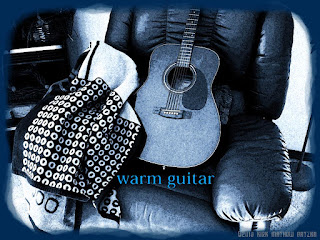
Warm Guitar Complete with Blanket - Photoshop


I just got an extension cord for my Wacom Tablet that allows me to disconnect it from my PC and then connect it to my Mac G4. Why would I want to do that? Because I wanted to explore Photoshop version 7 better.

This photograph, taken by myself, was put through some paces in both PhotoPaint and in Photoshop 7. I made a quadtone of it in PhotoPaint and then saved it to my Zip 100 disk so I could port it to the Mac.

In Photoshop 7 I used some of the Artistic filters on it to give it some grain and paint daubs. I adjusted the Curves to deepen the shadows. I was using the jpg file format to move between the programs with ease of use.
The title is somewhat an oxymoron as Blue is not the warmest color there is, but it is a comment on the blanket in the photograph, draped around the guitar.

I brought is back into PhotoPaint and added Filter Forges Freepack - Frames watercolor frame to the piece. I resized it there for the web.

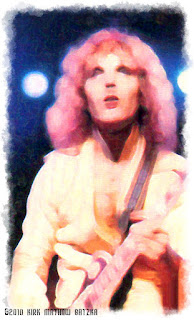
The second image is from Peter Frampton's, "Alive" cassette cover. I had scanned in the image and saved it in tiff format. Using the Zip 100 disk called Ferryboat2 I moved it over to the Mac G4 and used Photoshop on it for a painterly look and feel. The filters are different than what I have in other programs and I like the look of a variety of them. So I applied one here as well. It softened the image, I used Curves on it and adjusted the saturation of it in Photoshop.

Ferrying it back to the PC I added the watercolor frame to it in PhotoPaint.
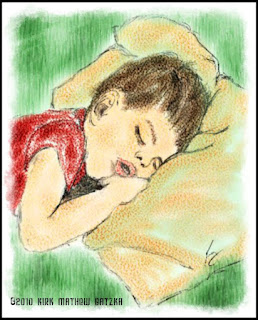
The third image is one of a sketch I did of my son, when very young, sleeping on a pillow. I scanned in the sketch and using Painter 8 painted it with watercolor brushes.

I also Ferried this to Photoshop and added a Gaussian blur with some texture as well as doctoring up some of the lines of the sketch with a black 2pixel brush. I again used a watercolor frame for it with a 10pixel black frame to finish it off.

I am still learning how to use Photoshop 7 and would love to have CS5 but it is cost prohibitive at this time so I use what I have to the best of my current knowledge and abilities.

Three very different images all done using Photoshop 7 and PhotoPaint.

Listening to --- Move in Time --- by Kirk Mathew Gatzka

Friday, May 22, 2009

Attractive Woman - Guitars


Searching for portraits I discovered the work of Vincent Boiteau on Flickr. His work is listed with a Creative Commons Attribution so I am giving him credit on the woman's portrait I used in my derivative piece shown here.

I took the woman's face into Paint.NET and used the Artistic> Pencil Sketch filter on it. I brought it and my Guitar photograph into PhotoPaint where I cropped the face and copied it to the clipboard then pasted it into the guitar image as an object.

I used the object properties and applied "multiply" on the face. Then I merged the two together. I gave credit for the portrait on the image to Vincent. I also used OptikVerve Labs Virtual Photographer to add grain to the guitar image at 1600 ASA Film #2. I love good grain in a photograph.

Now It appears that I have a mural face on the wall in my office/studio. Which would be cool, but I'd use a photograph of my wife instead, I do have three works on my walls that are framed with images of her as a younger woman, now. It is our Thirty-fourth Wedding anniversary on the Twenty-fourth of this month. So happy anniversary for us, this weekend!

----------------
Now playing on Windows Media Player: Beck - Tropicalia
null

Wednesday, February 18, 2009

Vector - Guitars


I have been enamoured of this way of creating images using Corel's Graphic Suite programs. Here is another Vector / Bitmap collage / montage piece I worked on today.

I love the guitar motif and add pretty girls and you can come up with a large variety of images.

I used CorelTRACE, CorelDRAW, and PhotoPaint to make this piece using similar techniques as I have before. I like the chunky funky feel of this style.

It generally starts with a photograph that I take or was taken by some one I know. At times I use those found on the web and I try to identify the original photographer to credit. I haven't found out who did the photo of the circle of guitars yet. If you recognize it, Please let me know it's origin so I can credit them properly.

I found out that my daughter has been doing some work on her PC in Photoshop 7 and am trying to talk her into sharing some of her work here in the future. She does really well using a mouse! Which is my down falling on the Mac G4 - no tablet from Wacom on it, so I don't use Photoshop 7 that much. I have Iomega's Zip100's on both machines so I can share data between computers. So I may use Photoshop 7 for some adjustments or filters from time to time. But it slows down the workflow so I don't usually do so.

Please feel free to comment on my work.

Friday, February 6, 2009

Experiments in Photo Montage

Here is another experiment in digital montage/collage work. I used many of the same methods described in my previous post.

Once again I used a photograph of a young lady and some Dover Publications Clip Art, and a quote from a Gutenberg Press novel.

I have found these types of pieces to be fulfilling to create and enjoyable to look at. The combination of each individual piece of the whole makes for an entertaining image. Each one adds interest and depth to it.

I don't do scrapbooking but if I did I would do it digitally using the same tools I use to create images like this.

I am going to add a link to Picasa 3 for those of you who have an interest in using it to keep track of your photographs and digital images you create. It is a good tool for that and has other functions that make it interesting to use in conjunction with your other image or photo editing software. So look for it and give it a test run to see if you like it as I do.

Tuesday, December 16, 2008

Blues Front Site Credit

I recently had contact from John Anderson of Blues Front <bluefrontbluesroom.org> identifying my previous Guitar Player Chording G as a photograph of Rick Payne from John's site as shown above. Thank you, John!

Here I am displaying Bluesman Dave Peabody, also from a photograph of John's. I used Corel's PhotoPaint and KPT's Collection filters to do this derivative piece.

Please visit John's site for an insider look at Blues and many performers. Let me know if the link doesn't work!

I have been busy with a family emergency so I haven't been doing much on the computer recently. So I don't have much to report. But that will change soon, I hope! I would like to write a tune about my experience with the hospital and the family emergency but I remain stunted for right now. A situation I hope to remedy soon.