Pages

Showing posts with label woodcut. Show all posts

Sunday, March 20, 2011

The Grainery - Dover Clip Art - Painter 11


A short post today, another Dover Publications woodcut painted in Painter 11. I opened in PhotoPaint and increased the working size of the image and saved it.

I reopened in Painter 11 and used some of Skip's Watercolors and then Karen's Watercolors from the Painter Talk forum. I tried to keep with a earth-tone color scheme and only vacillated from that a little for contrasts.


---------------
Now playing: Neil Young - Falling Off The Face Of The Earth
via FoxyTunes

Thursday, March 17, 2011

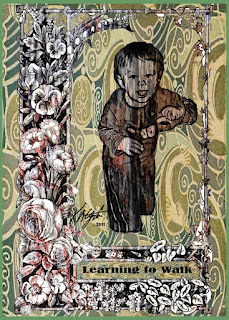
Learning to Walk - Digital Collage - PhotoPaint


A simple digital collage today of my Grandson, learning to walk. The floral frame is from Dover Publications as well as the Art Nouveau fill. The tree bark texture seen in the frame and my Grandson is from Mayang's Textures.

I opened the frame in PhotoPaint and resampled it to 96 dpi for a working size. Then I opened a photograph of my Grandson leaning on the coffee table in Painter 11 and applied the woodcut tool to the image. Back in PhotoPaint I cut him out with the freehand lasso tool. I then pasted him into the frame image.

I browsed in Picasa 3 to my Mayang's Textures and selected a tree bark texture and copied and pasted as new image in PhotoPaint. There I cropped it to size keeping the texture bold.

I took the image of my Grandson framed and copied and pasted it into the tree bark texture and made it transparent for the bark to show through. I set all the objects (layers) with Ctrl-Shift-Down Arrow. This left me with a white background.

In PhotoPaint I opened the fill window and edited the fill, and selected the Art Nouveau piece. After I pressed OK, I used the fill bucket to add it to the masked in white space. I added the words with the text tool and selected the text as an object to stretch it to fill the space.

----------------
Now playing: Go Betweens - Born To A Family
via FoxyTunes

Saturday, March 12, 2011

Troubadour Artisans Three - Dover Woodcut - Painter 11

Troubadour Artisans Three is from a Dover Publications woodcut, I regularly receive samplers from them, and I particularly liked this one.

I opened it in PhotoPaint and resampled it to 128 dpi for size. Saving that I opened it in Painter 11 and selected some Digital Watercolors to paint it with colorful patterns.

I did not do the drawing here at all, so don't give me credit for the woodcut. I only painted it selecting some royal colors for their vibrancy.

It was tedious work but very enjoyable to do, like a coloring book picture only using watercolors.


----------------
Now playing: The Beatles - Hard Days Night
via FoxyTunes

Thursday, March 10, 2011

Another Smiling Woodcut - Texture - Painter 11 - PhotoPaint


I selected this photograph taken by my son Keir M. Gatzka, of one of our friends. Opening it in Painter 11, I cropped to the smiling face and pasted to a new image. I applied the woodcut tool to the black and white image and saved it.

I reopened it in PhotoPaint where I resampled it to 128dpi. I then selected the wand tool and took as much as the gray areas out making the image a new object of only what was left.

Using Picasa 3 I browsed to Mayang's Textures and selected a rusty texture. I copied and pasted the new object, the young lady's face, into the texture and merged it. I cropped that to the smiling face and pasted to a new image.

With that piece was still in PhotoPaint and I went to Filter Forge's Photo Effects and applied a light grunge filter to it. Also using Filter Forge's frames I selected a film frame. Then I used Effects> Texture> Elephant Skin> in PhotoPaint, for more texture to the image.

----------------
Now playing: Kirk Mathew Gatzka - Smile Again
via FoxyTunes

Tuesday, March 8, 2011

From Laughing to Serious - Woodcut - Texture - Painter 11 - PhotoPaint


Yesterday, I did a woodcut of a laughing smile, today I chose a serious expression for an image. The photograph is of my son Keir M. Gatzka, a self-portrait. I browsed in Picasa 3 and found it and liked his seriousness. I opened it in Painter 11 and applied the woodcut tool with some adjustments to not make it heavy.

I saved that and using Picasa 3 I located the Mayang's Textures that I have and selected one of what appears to be sandstone. I copy and pasted the woodcut image using the texturize object property, in PhotoPaint. I applied the Auto Equalize tool to lighten it up a bit. Then I adjusted the Color Balance.

Using Filter Forge I added a film frame, after trying out some of their Photo Effects, which did nothing for the image but obscure details I wanted. So I stuck with the image as is.

----------------
Now playing: Kirk Mathew Gatzka - Close To Perfect
via FoxyTunes