Pages

Showing posts with label electric guitar. Show all posts

Sunday, April 24, 2016

"Step by Step: Electric Guitar Player XI" PicsArt App Plus

Electric Guitar Player XI

Another free to edit, a photograph here is the "Electric Guitar Player XI." I opened the picture in the PicsArt App in Windows 10 on my computer. I selected the Tools Enhance and upped the color a tad.

I used the filter in Artistic Effects called Polygon. This gave me some triangular shapes within the image. I adjusted them to show as many as I could without losing the piece's stability. I saved the large picture.

Next, I went to Lighting and grabbed a Bokeh layer, on this I used rotate tools to place the bulk of the lights on the bottom of the image. I used the property Screen to add the lighting. I went back to the Tools and chose the Curves to add depth to the colors, using the full RGB setting.

I added a border, selecting a blue and black balance for it. I then went to the Text tools and added my name and the year choosing black for the fill and outline. I saved this again.

I looked at the image in Picasa 3+ and decided to add some HDR appearance to the piece. I adjusted the Radius to a level setting and the Strength to a medium low one. I did this with Picasa's HDR Tool. Saving that I opened the image in Paint.Net to resize the piece for display.

72dpi, 1220 X 813, with 75 for compression, were the settings for the display picture. Be sure to click on the image for the larger view in your browser. Use F11 to see the Full Screen and F11 to return to the browser's regular setting.


Thursday, January 7, 2016

“Gary Clark Jr.” HDR Picasa - Painter Essentials 5

Gary Clark Jr. - Numb


I opened a screen capture of "Gary Clark Jr.," in Picasa 3+. I adjusted the Contrast of the image for the lighter appearance. Next I applied the HDR tool with the Radius set to Medium and the Strength also Medium. This was a PNG file, but I saved it as a JPG to work with.

I now opened with Painter Essentials 5 and used the Watercolor Sketch set. I set the Brush to Simple Water Brush small size and digitally painted the piece. I then selected the Colored Pencil Drawing set and a Calk Charcoal Brush medium sized. I added just a few Pencil Strokes to the image.

Using the Soft Cloner Brush, I hand painted back in some details of his face, and the microphone. This lets the HDR appearance show the changes it made. I saved that iteration.

Completing the piece I opened in Paint.NET and added my signature file as a layer. I sized and placed it and applied the layer property Additive to it for transparency. I merged the layers to finish the piece. Then decided to use Curves set to RGB to lighten the depth of colors a small amount. This image has plenty of saturation of color so I did not alter that at all. I saved again.

Gary's song “Numb!” is a favorite of mine, he is another of my Blues Rock Singer-songwriter Guitarist I turn to for listening and watching Videos of him perform.

Thus, I have one more image to add to my Music Themed Visual Artworks.

All names, copyrights and, videos or trademarks belong to their prospective owners, I only own the right to my Artworks and explanations of my workflow. 

Monday, January 4, 2016

"Joe Bonamassa - Mountain Time" Picasa - Painter Essentials 5 Plus

Joe Bonamassa - Mountain Time


I use Pandora on my Smartphone and my Tablet to listen to Music. One of my Shuffle Artists to listen to is Joe Bonamassa, along with a few others. I also enjoy Videos of Bonamassa performing his Blues Rock Music. I have used Picasa for some screen captures of Joe playing his favorite Guitars.

I opened Picasa and selected one of those screen captures, “Joe Bonamassa – Mountain Time.” I increased the Highlights a bit and the Color Temperature as well. I applied the HDR tool in Picasa for that effect the Radius Medium and the Strength Medium settings. I saved that file.

I next opened in Painter Essentials 5 and used the Oil Painting set with a small Dry Brush. I used the Soft Cloner Brush to add back in details of his face, Guitar, and clothing. I created a new layer with the same unpainted image in it and applied the Colored Pencil set with another small brush. I dropped the layers together for one background and saved it with a new name.

I used Picasa's Border with only the outside border showing and added corner curves to that. Saving again I opened that file in PhotoPaint and added my signature layer, sizing it and placing it using the property Add for transparency. I saved that iteration.

I Resampled at 120dpi and increased the size of the image before resizing for display, saving again. Next I resized for display 120dpi, 75 compression, and 25 smoothing, saving as a JPG.

The “Joe Bonamassa,” name, and all song originals belong to their prospective owners and I do not own the rights to these.

Monday, December 28, 2015

"Lead Guitar Player III" Picasa - Painter Essentials 5 Plus

Lead Guitar Player III


Continuing with a music theme I chose another "Lead Guitar Player III" photograph to Digitally Paint. I opened first in Picasa 3+ and applied the HDR effect with the Radius Medium and the Value, or Strength to Higher. This gave the image great tonal contrasts. I saved that change.

In Painter Essentials 5 I selected  the Oil Painting set with a Digital Watercolor Diffuse Water Brush, thus set I Digitally Painted the HDR image. I used Apply Surface Texture Effect with Image Luminance Texture. I then did a light Detailed Watercolor, still using the Diffuse Water Brush, stopping the set before it completed.

In Picasa again I applied and added a Black Border to the piece and saved that iteration.

Using Paint.NET I added my signature layer with the property Additive for transparency. I saved that iteration at 100%, 120dpi. I next resized the image to display size 95 compression and 120dpi JPG.

As always I encourage my readers to click on the image to view the large piece for all details and the best of views. Open from your browser, use F11 (in most browsers) for the full screen view and go back to the regular setting by using F11 again.

I am hoping to add some newer Digital Download CDBaby Singles in the coming months. I invite you to listen the the Full Previews as you visit gatzkART!. Just use the CDBaby Kiosks lower down on the page of images and explanations. I have ten songs for your enjoyment.

You may also notice a Featured Post added to the page on the right hand side. I will be featuring different older posts here for you to review. I will be using Music Posts here and other multi-viewed posts that seem to have been favorites through the time frame of this blog. Click and enjoy the Featured Post as you are attracted to them. 

If you enjoy my Artwork and Music you can Subscribe to my Feedburner Email list for updates to your own email address when I post new works! Add your email address and click Subscribe. Your privacy is very important to me and I will not resell or give out your addresses! Thanks!

Monday, March 24, 2014

"Rust Grunge Practicing Electric Guitar" Corel

Practicing Electric Guitar Grunge Rust


I dug through some of my photographs and I got this one today from my External HDD. An Electric Guitar Player Practicing. I opened in Corel PhotoPaint and then selected a Rust Grunge Texture for This image.

Similar to a recent image, I took the photograph and after flipping it to face the opposite side, I applied the Adjust, Threshold to it, upping the white space considerably. I then opened a large Grunge Rust file and set and placed the Guitarist on the rust. I applied the property Multiply and the transparency allowed the rust to show through.

I saved that iteration, after applying my signature in white. I opened in Corel PSP Pro X3. Now I adjusted the Saturation Vibrancy to add punch to the colors. I added Image Information, Title, Copyright, Programs used, etc.

I then resized the image for display. I added a Daguerreotype Frame and I also added a Black border to set the image off. I saved that file and began to blog.

Tuesday, September 11, 2012

"Grunge Trio of Electric Guitars" Corel PhotoPaint - Plus

Trio of Electric Guitars


I opened Picasa 3.9 and browsed to my Mayang's Textures. I selected a crosshatched cloth background and opened with Corel Painter Photo Essentials 4. I auto painted it with my favorite Watercolor Sketch. This gives me both the watercolor and the sketchy lines that worked so well with this texture.

Browsing in Picasa again I found an Electric Guitar and copied it and pasted it into Corel PhotoPaint where I already had the background open. I made a trio of the guitars placing them onto the background. I selected them all and used the Property Color Burn for transparency. I merged them together to the background.

Using the plugin Filter Forge's Frames I added a Grunge frame variant to the image. I chose a couple of my guitar picks, one from Guitar Center and the other from Elderly Instruments and scanned them in at 600dpi. ( I usually use Jim Dunlop picks for playing, but I have a small collection of guitar picks.) I used the auto Unsharp Mask on for these scan. I pasted them onto the background using differing properties for transparency.

I adjusted the image with Auto Equalize to lighten the color a slight amount. Adding my signature in white I saved the large iteration. I resampled for display.

Don't forget you can always click on my images for a larger view. It shows the details much better.

960 and counting to 1,000 Posts!

Sunday, May 13, 2012

"Six Grunge Guitars" Digital Collage - Corel PhotoPaint - Plus

Six Grunge Guitars


"Six Grunge Guitars," was done in Corel Painter Photo Essentials 4 and Corel PhotoPaint. I browsed to my Mayang's Textures folder in Picasa 3.9 and opened a colorful texture in Essentials. I used the Impressionistic feature to Auto Paint the background.

I saved that large file and through Picasa reopened with PhotoPaint. Browsing more in Picasa I located the six guitars to which I applied Little Ink Pot's Thredgeholder for the inky grunge effect. I applied the property of Multiply to each for transparency, creating an even black ink appearance.

I pasted and resized to fit each of the guitar images, placing them to form the composition. I merged all with the background. I selected Filter Forge's Frames film frame for the borders.  I used the Tone Curve to lighten the colors a bit. I added the words using the font 321impact and using Effects, Distort, Wet Paint for the dripping paint effect.

I added my signature and I saved that large file again then resampled for display here.

Listening --- Yes --- Roundabout

Tuesday, May 8, 2012

"Grunge Electric Guitar" Corel Painter Photo Essentials 4 - Plus

Grunge Electric Guitar


I opened Picasa 3.9 and browsed my guitar photographs, I selected this Electric Guitar and created a Grunge look and feel to the image. I opened with Corel PhotoPaint and resampled to 150dpi and applied the Local Equalization tool. This made the light background almost all white with some areas of color left over.

I used the Wand tool and created a mask covering the guitar. Then I used the Fill tool to make a gradient background of blues. I saved this file, then opened with Corel Painter Photo Essentials 4.

I auto-painted using the Chalk features as a small Hatch brush. Then added the Pastels feature with a coarse background paper texture. Then I used the Simple watercolor auto-paint. I stopped that after it left the fine lines in the Guitar body.

I saved that file, then realized I wanted some more Texture to the image. I Opened with Corel Painter 11 and used Apply Surface Texture Luminance. I saved that iteration.

To finish off the image I opened with Corel PSP Pro X3 and added my signature using the Image, Visible Watermark to the Lower-right. I also added a blue border of 25 pixels. I then used the Image, Picture Frame using the same setting twice for a double painted square. I also added the small Black frame using Picture Frame.

I saved that file then resized for display for today.

Musically, I have been using Steve Krenz' Pentatonic scales for C Major or A minor to play some blues riffs (lead) along with a track of Blues in A I found on YouTube. I have a plethora of Electric guitar styles with the Gearbox software using the Toneport UX1 from Line 6. So I kept sampling differing lead riff sounds, just having a ball playing.


Wednesday, February 8, 2012

"Grunge Guitar Trio" Corel PhotoPaint

Grunge Guitar Trio


Getting some advice on the song "Playing In A Vacuum," to highlight another verse, and drop one chorus. Perhaps a change in the Key as well, then back to the original Key.

With the song in mind I worked on a Digital Collage today. It has a grunge background and a trio of guitars. I added a snippet of the song's chords and lyrics using a Typewriter font. In keeping with the grunge theme I added wet paint drippings to the words and some paint splatters.

On the three guitars I applied Little Ink Pot's Thredgeholder for a rough sketch look and feel. I deliberately kept a balanced composition. I did apply the Tone Curve to the cracked concrete background to enhance the color depth.

I did all this in Corel PhotoPaint with Picasa 3.9 for browsing to the folders where I had the images of the background, and guitars.

Listening --- Bob Seger --- Night Moves

Saturday, December 24, 2011

"Blue Guitars" Digital Collage - Corel PhotoPaint - PSP Pro X3

Blue Guitars

Today's image is a Digital Collage of a texture from Mayang's Textures (of concrete,) two photographs of Gals playing Guitar, and two photographs of Guitars hung in display.

I browsed in Picasa 3.9 and found all the images with the exception of the texture which is newly downloaded as of yesterday. It is a densely packed collage with redundant guitar images and a Blue's color. I built the original image in Corel's PhotoPaint, but I also used Paint.NET for the Ink Sketch and Pencil Sketch tools.

After I amassed the collage to where I wanted it, I applied the blue tint to it in Picasa 3.9. I saved the file and opened with Corel's PSP Pro X3 adding a rough frame then adding the Cyan frame after that.

I added my signature and resampled for display in PhotoPaint.

Listening --- Kirk Mathew Gatzka --- The A Shuffle

Tuesday, October 18, 2011

"Pontiac Music and Sound" Waterford, Michigan Corel PhotoPaint


Hand Holding Electric Guitar
Violins

Classic Kay 6-String Guitar

Peavey Equipment

Dobro 6-String Guitar


Front Desk

Collection of Electric Guitars

I recently visited Pontiac Music and Sound in Waterford, Michigan with my son and we took some Photographs. I used my High Contrast workflow on the photographs.

I opened them in Corel's PhotoPaint and applied the Local Equalization tool. Then I used the Tone Curve to add color depth to each image. I upped the saturation for a boost to the colors as well.

It is a simple workflow that results in some deeply colored and textured images with plenty of contrast.

Listening --- J J Cale - Eric Clapton --- Danger

Saturday, April 16, 2011

Orange with Contrasting Blue - Stringed Electric Instruments - PhotoPaint

High Contrast - Electric Stringed Instruments

Another high contrast image, continuing with this motif of stringed instruments. Here is a piece that I browsed in my folders in Picasa 3 and then opened with PhotoPaint. I cropped the image to focus on the red orange instruments and saved that image.

While in PhotoPaint I used the Tone Curve to add depth and upped the saturation of the color. Then I applied Local Equalization for the high contrast that I have been using on my most recent images. I used the Tone Curve again to give even more depth. I used Filter Forge's Photo Effects Lumo tool to add the bluish caste and compliment to the red orange.

I saved the larger file then I resampled for display here still in PhotoPaint. I saved that file and uploaded to my Picasaweb gatzkART! album and shared it here.

Listening --- Kirk Mathew Gatzka --- Subtitle Run Instrumental

Tuesday, March 1, 2011

Interview with Marty Minui of Motor City Guitar - Waterford, Michigan

Marty, first of all let me thank you for taking the time to do this interview.

Thanks so much for asking us, Kirk!

I'd like to know more about the beginnings of Motor City Guitar, when did the store first open, What were your goals and how long have you been serving such a broad scope of musicians?

We opened in June of 1988, which seems like yesterday. Our goal as a store was to create a place where people could go a just feel welcome to try out cool music gear and get a good deal without a hassle or pressure. We've always had the goal of trying to take care of people as individuals with individual tastes, which is one of the reasons why we carry so many different varieties of products. It's not all about what we like, it's about what you like. As far as personal goals, my girlfriend Melissa and I were trying to get steady jobs so we could get married, which we did a year after we opened Motor City .

Who were the ones who began the store? And what is the size of your staff now?

Melissa and I pretty much did everything ourselves for the first few years, except for lessons. We've always had a pretty minimal staff, where everybody wears a lot of hats. Right now there are 9 of us plus 14 teachers and our repairman Scott.
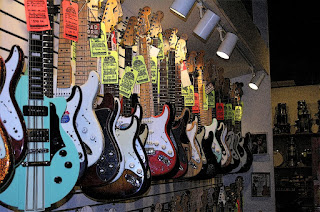
When you began did you think that you would be as successful as you are now?

We've never really thought about success in any sort of tangible, financial, or other measurable way, we just keep doing what we’ve always done and being grateful for being able to do it at all. What makes me feel successful is anytime a customer leaves with a big smile on their face, or when they comment that one of our guys really helped them out, or when they hand me a CD of music that they created that we played any small part in helping them with.

I really enjoy the atmosphere of the store, it lends itself to trying out the instruments and the personal growth of your clientele. What do you attribute this to?

Thanks! These are great questions. I remember the days when a lot of music stores kept everything out of reach and practically required you to prove you were going to buy something before they would even let you touch anything. I never understood that backwards way of thinking – how in the world is somebody supposed to even know if they like something unless they can check it out without pressure? We’ve always considered ourselves lucky when people come in and check out our store, and we don’t want anybody to feel under any kind of pressure to buy anything. We want to give them a chance to check out some cool gear, have some fun, and hopefully consider us when they do decide it’s time to pick up some new toys.

Tell me a bit about the expertise of your staff and instructors.

We are extremely proud of the Motor City crew, they are our extended family. We couldn’t ask for a greater bunch of people to work with, and the place would be nothing without them. The majority of people who work here and have ever worked here over the years are customers of the store who have an obvious passion for music and music equipment – in other words, certified “gearheads”. And people that we feel will treat customers with kindness, appreciation, respect and honesty. Those are the types of things we look for, the types of things that a person can’t really learn in training. As for our instructors, we have different people from different backgrounds who specialize in different styles of music. They are all absolutely incredible musicians. We try to match each student with a teacher that is right for them and will help them move in the direction that they want to go in. We also have a really talented guitar repairman named Scott Kenerson who really takes a lot of old-school pride in his work.

I understand that you do your best to offer great pricing on all instruments, how has that made you different from other guitar establishments?
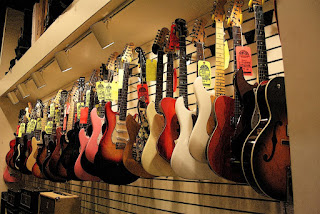
I can honestly say that we sincerely want to give people that come to our store the best deals possible. If we didn’t, why should we expect them to come back? We’ve always been more concerned with long term relationships and hopefully making people happy so they come back and tell their friends. In the early days of our store it was not common at many other music stores to offer discounts unless they were having a sale, everything would be tagged at the manufacturers’ list price and you had to negotiate for a better deal. As a customer myself I never liked that, I don't feel like people should have to haggle for a discount. So we discounted everything as much as we could right off the bat. We figured that by offering lower prices we wouldn’t have to advertise, that word-of-mouth and hopefully repeat business would keep us around. Luckily, when things like mail-order and the internet came around, it wasn’t a shock to us as it was for many other places, we were already discounting heavily so it wasn’t a big deal. We stay on top of what other stores are doing and always try to make sure we are offering the best prices, that’s the least we can do.
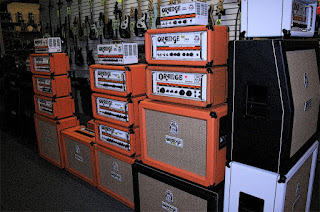
What were the greatest challenges you've had along the way?

The biggest challenge by far is finding the time to get everything done that we need to. Our website is the most obvious example, we’ve been trying to get a great website going for years but it is taking much longer than we’d hoped. What we have planned is going to be sweet though, hopefully it will be worth the wait. Another hurdle was a recent expansion of the store that we went through, we had quite an ordeal with a shady contractor but thankfully that is over now and we can finally start enjoying and making use of the extra space.

When you think of the store itself what is the most successful area of sales Electric guitars, equipment or Acoustic guitars?
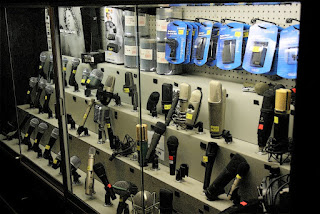
Things go in waves, sometimes electrics are more popular, sometimes acoustics are. Ukeleles are even big right now all of a sudden! And then there are days when there are more drummers or bass players in the store than guitar players.

Over time who are some of the Artists you have had the privilege to serve?
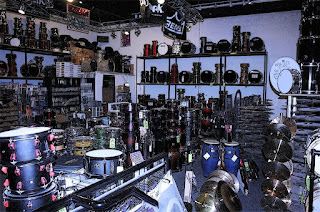
We deal with all types of artists everyday that we are privileged to serve. Everybody from little kids taking lessons to internationally touring bands. Michigan is and always has been a hotbed of incredible music and there are unsigned artists here that in my opinion blow away a lot of the stuff you hear on the radio these days. One week we had 2 very elderly WWII veterans come in that both wanted to start playing guitar again, it was a special honor to serve them. As far as famous people go, we've served some Detroit legends like Bob Seger, Kid Rock, and members of The Silver Bullet Band, The Romantics, The Rockets, The Mitch Ryder Band, Sponge, and The Black Dalia Murder. We had to provide a wall of amps for Ted Nugent to play on New Years Eve one year. We also serve a lot of artists that come through town on tour - one of my favorites was selling a couple of cowbells to Blue Oyster Cult so they could do the "more cowbell" routine onstage at DTE. One time we provided guitars for Steve Vai when his gear truck broke down, and we provided all the instruments for the Deftones when their gear truck was stolen from their hotel parking lot. Our repairman Scott sometimes goes out on the road as a guitar tech for some major artists. We’ve also been privileged to have worked closely with some landmark Michigan clubs like St Andrews Hall and the Crofoot Ballroom who ordered their PA systems through us.

What do you personally like about Motor City Guitar and your clientele? And why would you recommend this store to others?

It’s a fun place to work and hopefully a fun place to visit. There are tons of cool people that come here that keep things interesting on a daily basis. Our customers are more like friends, and a lot of them are literally like family to us. People often say that we should have a TV show up here because there is usually something interesting or funny going on. Personally I also take a lot of pride in knowing that simple principles like treating other people like you would like to be treated yourself are enough to keep a company in business. As far as recommending our store to others, all I can say is that I promise you that you will be treated with honesty and appreciation, and that we will always do everything we can to bring you the biggest selection of the best gear we can find.

Thanks again for taking time from your busy schedule for us and doing this interview.

Thanks so much for having an interest in Motor City Guitar, Kirk! It's been an honor!


----------------
Now playing: Aerosmith - Living On The Edge
via FoxyTunes

Friday, February 12, 2010

Return to Guitar Motif - Two Images - Digital Collage


I return to the motif of Guitars and the method of collaging using many filters and tools.

With figure One I used a sand background for the basis of the image. Taking photographs of guitars I applied filters such as the Solarize filter for the 12-string, and the Thredgeholder to another and Difference to yet another. Taking these I combined them into a collage. I then used the font WT Rhesus B Bta for the paint splatters.

Figure Two I created a texture background in TwistedBrush using the watercolor brush and the different paper/canvas textures. I highlighted the last color of a light brown beige using a wood cut texture.

I opened a number of guitar images and duplicated them and mixed them into a collage along with Solarize filters and color burn object properties.

Both Figure One and Two were created in PhotoPaint. Using many of the tools and filters as well as those described above.


----------------
Now playing on Windows Media Player: Bread - The Guitar Man
null

Friday, October 23, 2009

Change of Pace - Autumn Squash - Corel Painter 8 - Visit to MotorCity Guitar


Autumn is the time for pumpkins and squash. My wife had purchased some squash and I took a couple of photographs of them grouped together against the backdrop of our Corian counter and our red kitchen wall.

I thought it would make a nice simple painting. So I opened the photograph in Painter 8, cloned it and selected all and cleared the image the deselected it. I used the tracing paper for the image. I was using the Digital Watercolors brushes to rough in the painting.

After I roughed it in I added some soft cloning to bring back some of the details of the squash. I used the Texture Spray clone brush to add some texture to the squash. It was a very straight forward painting.

I visited Motor City Music store of Waterford, Michigan, the other day and played some fine guitars. I would like to add a 6-string as an additional guitar so I was looking for one. I first
picked up a Seagull 6-string and tried that one out and since I like my Seagull 12-string I really found this one to be easy to play and comfortable, too. It had a full sound with a good balance of bass and treble tones.

I played some Taylor's and Guilds, an Ovation and a Takamine 12-string. I truly enjoyed my visit and pricing guitars I found that the Seagull was the best priced and one of my favorites along with one of the Taylor's, which was more expensive.

I always test out the 6-string guitars with the Drop D tuning and Double Drop D and the DADGAD tuning. I use the standard tuning as well and they were impressive guitars all reasonably priced.

I jammed with another customer who played some lead to my rhythm guitar. We did a little blues and folk rock.

I would like to own a electric guitar too but I did not try any out that day, just the acoustic and acoustic electric guitars.

----------------
Now playing on Windows Media Player: Kirk Mathew Gatzka - Photographs
null

Sunday, July 12, 2009

Electric Guitars Changed Music


Electric Guitars have changed the face of music. Wikipedia states:

"An electric guitar is a guitar that uses pickups to convert the vibration of its steel-cored strings (sometimes nickel) into an electrical current, which is made louder with an instrument amplifier and a speaker. The signal that comes from the guitar is sometimes electronically altered with guitar effects such as reverb or distortion. While most electric guitars have six strings, seven-string instruments are used by some jazz guitarists and metal guitarists (especially in nu metal),[1] and 12-string electric guitars (with six pairs of strings, four of which are tuned in octaves) are used in genres such as jangle pop and rock."

Tremolo, reverb, distortion, wah wah, voice augmented electric guitars are amazing instruments. They made such an impact on the music scene that it has barely recovered. Wonderful fascinating sounds come from these instruments. Accompanied by voices, basses, drums, horns, organs, pianos and whole symphonies they are an indelible part of today's music.

And I think that music is better for it. Although I do not own an electric guitar, I may someday. In the mean time I use my Seagull 12-String Guitar with it's Seymour Duncan Woody pickup to play through my Toneport UX1 and Gearbox software to make electric guitar like music. Computer assisted as it is, it the best I can do for now and it satisfies my desire to use the above mentioned effects that you can get with an electric guitar. I just can't reach those high notes on the neck of my guitar.

Today's image is about electric guitars, I used another textured background and the Thredgeholder filter for the guitars. Added a couple grunge font typestyles and a black frame. I used Corel's PhotoPaint for all the effects and object manipulation. Kudos to Corel Products for such fine graphic tools.

----------------
Now playing on Windows Media Player: Bonnie Raitt - That's Love Sneakin' Up On You
null